
Best Windows VPS Server [2026 Expert Guide]
Choosing the best Windows VPS server depends on more than just pricing—it’s about performance consistency, Windows compatibility, infrastructure quality, and how well the provider supports real-world use cases like RDP, hosting, automation, and enterprise workloads.
In this guide, we’ll break down the best Windows VPS providers, including Kamatera, OperaVPS, Vultr, IONOS, and InterServer, compare their strengths and weaknesses, and help you choose the right solution based on real-world needs.
How to Identify the Best Windows VPS for Your Needs
Before making a final decision, it’s worth reviewing how different providers structure their Windows VPS plans in terms of resources, locations, and system setup.
For a practical example, explore best Windows VPS Hosting configurations to see how modern setups support different use cases.
Key Criteria
Performance (CPU + NVMe SSDs): Critical for RDP, trading, and applications
Windows Licensing Options: Included or bring-your-own-license (BYOL)
Global Datacenter Coverage: Lower latency for users worldwide
Scalability: Easy upgrades without downtime
Flexibility: Flexible Windows Server options (2016, 2019, 2022)
Pricing Transparency: No hidden fees
Support Quality: Especially important for Windows-specific issues
5 Best Windows VPS Hosting [Tested List]
1. Kamatera – Highly Customizable Cloud VPS
Kamatera is known for its flexible cloud infrastructure, making it a strong choice for businesses needing tailored configurations.
Key Features
- Fully customizable VPS (CPU, RAM, storage)
- Multiple Windows Server versions available
- Global data centers across several continents
- Hourly billing model
Advantages
- High level of scalability and control
- Suitable for enterprise-level deployments
- Fast provisioning
Disadvantages
- Windows licensing often increases the total cost
- Requires technical knowledge for optimal setup
- Performance depends on configuration choices
👉 Best for: Developers and enterprises needing flexibility.
2. OperaVPS – Optimized Windows VPS Environment
OperaVPS, as one of the best Windows VPS hosting providers, offers a Windows VPS platform designed for stability and consistent performance across common Windows-based workloads.
Key Features
- NVMe-based storage for improved read/write speeds
- Dedicated resource allocation
- Multiple global server locations (US, EU, Asia)
- Instant deployment with ready-to-use Windows environments
- Full RDP access with stable connectivity
- Transparent pricing without hidden fees
Strengths
- Consistent performance across long-running tasks (e.g., automation, remote desktops, trading)
- Windows environments configured for immediate usability
- Balanced infrastructure that reduces performance fluctuation
- Suitable for both technical and non-technical users
Considerations
- No hourly billing option
- Less suitable for small teams with limited budgets
👉 Best for: Developers, traders, and remote teams who prioritize stable Windows performance and predictable behavior across workloads.

3. Vultr – Wide Global Coverage
Vultr is a popular option among developers due to its extensive network of global data centers.
Key Features
- 30+ worldwide locations
- High-frequency compute options
- API-driven infrastructure management
- Windows deployment support
Advantages
- Excellent geographic coverage
- Fast deployment times
- Flexible infrastructure via API
Disadvantages
- Windows VPS instances are relatively expensive
- Limited managed support
- Performance can vary by region
👉 Best for: Projects requiring global server distribution.
4. IONOS – Entry-Level Windows VPS
IONOS provides basic VPS solutions with Windows support, often positioned for entry-level users.
Key Features
- Simple VPS plans
- Data centers in Europe and the US
- Windows Server availability
Advantages
- Easy to set up
- Suitable for small workloads
- Structured plans for beginners
Disadvantages
- Limited performance under heavier workloads
- Fewer advanced configuration options
- Less consistent resource allocation
👉 Best for: Small-scale projects or basic usage.
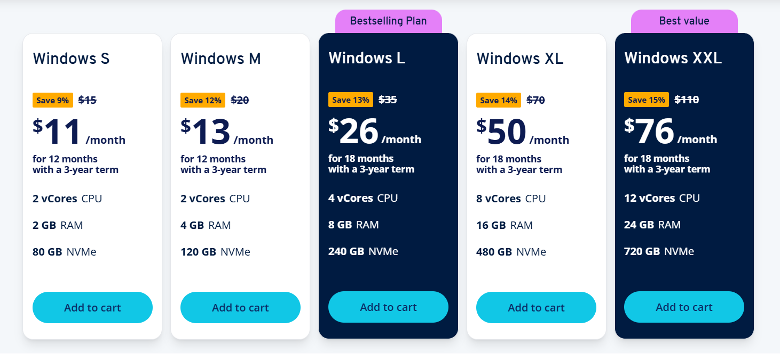
5. InterServer – Stable but Conventional Setup
InterServer focuses on long-term stability and straightforward VPS offerings.
Key Features
- Fixed pricing structure
- Windows VPS configurations available
- US-based infrastructure
Advantages
- Predictable service model
- Reliable uptime
- Straightforward management
Disadvantages
- Infrastructure is not as modern as newer providers
- Limited data center locations
- Performance not optimized for demanding workloads
👉 Best for: Users seeking a simple and stable VPS environment.
Comparison of the Best Windows VPS Server
| Provider | Performance | Windows Optimization | Global Coverage | Flexibility |
| Kamatera | High | Moderate | High | Very High |
| OperaVPS | High | Very High | Moderate | High |
| Vultr | High | Moderate | Very High | High |
| IONOS | Moderate | Basic | Moderate | Low |
| InterServer | Moderate | Moderate | Low | Moderate |
Key Differences That Matter in Practice
When comparing the best Windows VPS providers, the differences often appear in real-world usage rather than specifications:
1. Performance Stability vs Raw Power
Some providers offer high peak performance but may show fluctuations under sustained load. Others focus on consistent resource delivery, which is often more important for:
- Remote desktop environments
- Automation tools
- Continuous workloads
2. Windows Optimization
Not all VPS environments are tuned for Windows. Providers that pre-configure and optimize Windows setups tend to deliver:
- Faster RDP responsiveness
- Better compatibility with GUI-based applications
- Reduced setup time
3. Infrastructure Approach
- Cloud-heavy providers (like Kamatera, Vultr) prioritize flexibility
- More specialized providers focus on usability and stability
How to Choose the Best Windows VPS Hosting
Choosing the best vps windows depends on your use case:
Choose Kamatera if:
- You need full infrastructure control
- Budget is not a concern
Choose OperaVPS if:
- You want the best balance of price, performance, and usability
- You need a reliable Windows-optimized VPS
Choose Vultr if:
- You need a global deployment
- You are comfortable managing infrastructure
Choose IONOS or InterServer if:
- Your needs are basic
- Performance is not critical
Final Thoughts
The search for the best Windows VPS provider should focus on real usability—not just specifications or pricing tables.
Understanding these differences allows you to choose a VPS that aligns with your workload rather than relying on generic “best hosting” claims.
If your priority is a reliable Windows environment with consistent behavior across common use cases, exploring providers with Windows-focused optimization can make a significant difference in long-term performance and usability.