What Happens to Your Internet Connection When You Use a VPN?
A virtual private network is often described in simple terms: connect to a VPN, and your internet traffic becomes private.
That explanation is useful, but it leaves out an important part of the story.
A VPN changes how traffic travels between your device, your internet service provider, and the websites or services you access. It can affect routing, latency, DNS requests, bandwidth and even the apparent location of your connection.
Understanding what happens behind the scenes makes it easier to decide when a VPN is useful and when it may introduce unnecessary compromises.
Your normal internet connection
Without a VPN, a device typically connects to a local router or mobile network before traffic is sent through the internet service provider.
When a user visits a website, the request travels from the device to the router, through the ISP’s network and eventually toward the destination server.
HTTPS encrypts the contents of communication between the browser and the website, which prevents many third parties from simply reading the information being exchanged.
However, HTTPS does not hide every piece of connection information.
Network operators can still observe metadata such as the destination IP address, connection timing and traffic volume. DNS requests can also reveal which domains a device is attempting to access if encrypted DNS is not being used.
This is one reason VPNs can provide an additional layer of privacy.
What changes when a VPN is enabled?
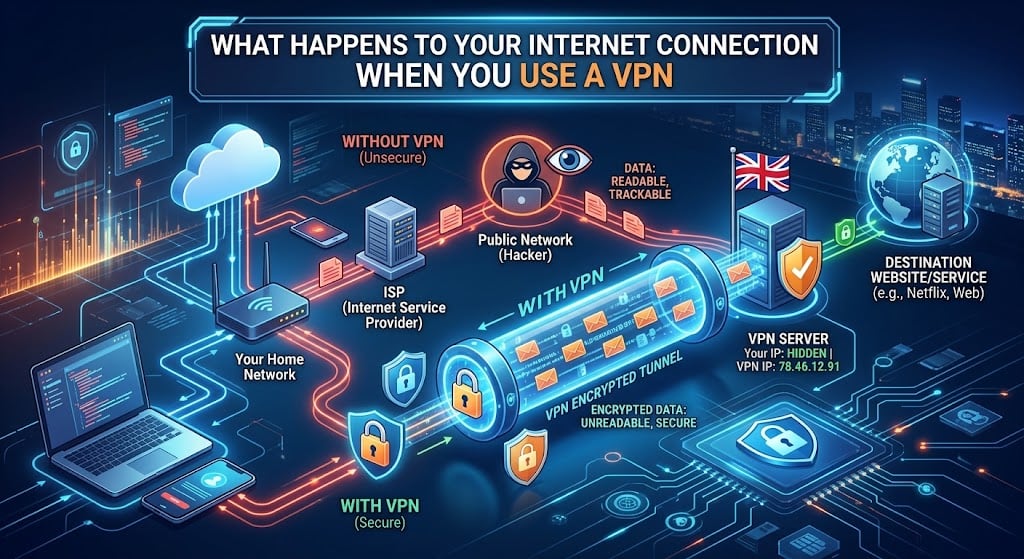
A VPN creates an encrypted connection between the device and a VPN server.
Instead of connecting directly to the destination website, traffic first travels through the VPN server.
The basic path becomes:
Device → Router → ISP → VPN server → Internet destination
The destination website generally sees the VPN server’s public IP address rather than the user’s original public IP address.
At the same time, the local network and ISP can see that the device is communicating with a VPN server, but the VPN tunnel makes the contents of that traffic much harder to inspect.
The VPN therefore changes which party can see different parts of the connection.
This distinction is important because a VPN does not make someone completely anonymous.
The VPN provider becomes an important part of the connection
There is a trade-off that is sometimes overlooked.
Without a VPN, users largely trust their ISP to handle their internet connection appropriately.
With a VPN, part of that trust shifts toward the VPN provider.
The provider operates the server through which the traffic passes, meaning its privacy practices and technical infrastructure matter.
This is why users should look beyond marketing claims when selecting a VPN service. Logging policies, jurisdiction, security protocols, ownership, transparency and the provider’s overall reputation are all worth considering.
A VPN should be treated as part of a privacy setup rather than a magic invisibility switch.
Why a VPN can affect latency
The extra routing introduced by a VPN can influence performance.
Suppose a gaming PC in one city normally connects to a nearby game server. The traffic may take a relatively direct route.
If the player connects to a VPN server located several hundred or several thousand kilometres away, the packets have to travel to that VPN server before continuing toward the game server.
That additional distance can increase latency.
For everyday browsing, the difference may be barely noticeable. For competitive online gaming, however, even a modest increase in latency can matter.
This is why gamers should generally choose a VPN server geographically close to their physical location or the relevant service when performance is important.
Why VPN speed varies
VPN performance depends on more than the speed advertised by an internet provider.
Several factors can affect the final result:
- Distance between the device and VPN server
- Distance between the VPN server and destination
- Server congestion
- VPN protocol
- Encryption overhead
- ISP routing
- Wi-Fi quality
- Router performance
- CPU performance on the device
Modern computers generally have enough processing power to handle VPN encryption without a major performance penalty. However, older routers and low-powered networking hardware can behave differently.
This becomes particularly relevant when a VPN is configured directly on a router.
VPN on a PC versus VPN on a router
There are two common approaches to protecting a home network with a VPN.
The first is to install a VPN application directly on individual devices.
This provides more control. A user can choose which devices use the VPN and which connect normally.
The second option is configuring the VPN at the router level.
This can protect multiple devices automatically, including devices that do not support VPN applications themselves.
However, router-based VPN configurations can place additional demands on the router’s processor. Some older or inexpensive routers may struggle to maintain high throughput while encrypting traffic.
For users with fast fibre connections, this can create an unexpected bottleneck.
A connection capable of several hundred megabits per second may deliver considerably less through a VPN if the router does not have enough processing capacity.
Encryption is not the same as speed
VPN encryption exists to protect the traffic inside the tunnel.
More encryption does not necessarily mean that a VPN is “faster” or “more secure” in a simple linear relationship.
Modern VPN protocols are designed to provide strong security while minimizing unnecessary overhead.
The protocol used can therefore have a noticeable effect on performance.
Users should also avoid assuming that the VPN with the largest number of available servers will automatically deliver the best experience. Server quality, network capacity and geographical distribution can matter more than the raw number of locations advertised.
DNS is another piece of the puzzle
When a user enters a domain name into a browser, the device needs to determine which IP address corresponds to that domain.
This process involves DNS.
If DNS requests continue to use the ISP’s resolver while other traffic travels through a VPN, some information about browsing activity could potentially remain visible to the ISP.
A properly configured VPN can route DNS requests through its own infrastructure or another protected resolver.
This is one reason it is worth checking how a VPN handles DNS rather than focusing exclusively on whether the VPN encrypts the main traffic tunnel.
DNS leaks can also occur because of incorrect configurations, network changes or software conflicts.
VPNs do not protect everything
A VPN is useful, but its capabilities have limits.
It cannot protect a computer from malware that has already been installed.
It cannot stop a user from entering a password into a phishing website.
It cannot prevent an online service from associating activity with an account when the user is logged in.
It also cannot protect information after it reaches the destination service.
For example, if an online retailer stores a customer’s name, address and purchase history, the VPN does not prevent the retailer from having that information.
The VPN changes the network path; it does not erase the user’s digital identity.
What about public Wi-Fi?
One of the most practical situations for using a VPN is connecting through networks that the user does not control.
Hotels, airports, cafés and other public locations can have large numbers of devices connected simultaneously.
Hardware Secrets has previously covered the risks of using public Wi-Fi and how encrypted VPN connections can help protect traffic on these networks.
For users who frequently work from cafés or travel with laptops, a VPN can therefore be a useful additional security layer.
Planet VPN is one example of a VPN service that can be used to encrypt a user’s connection when accessing the internet through networks they do not fully trust.
That said, users should still avoid suspicious websites, maintain updated software and enable multi-factor authentication on important accounts.
Does a VPN always make sense?
Not necessarily.
Someone using a trusted home network for ordinary activities may not need a VPN for every connection.
There can also be situations where a VPN creates compatibility or performance problems. Some websites and online services block known VPN IP addresses, while certain applications may behave differently when traffic is routed through another location.
Streaming platforms, banking services and corporate networks can also apply additional security checks when they detect a connection coming from a VPN server.
For this reason, VPN use should be based on the user’s needs rather than the assumption that a VPN must always be active.
A VPN is another networking component
The easiest way to understand a VPN is to think of it as another layer in the network path.
It changes where traffic travels, which IP address is presented to websites, how the local network sees the connection and which organization becomes responsible for operating the encrypted tunnel.
That can provide meaningful privacy and security benefits, particularly on untrusted networks.
But it can also introduce additional latency, consume networking resources and shift part of the user’s trust from the ISP to the VPN provider.
For PC enthusiasts and hardware users, understanding those trade-offs is more useful than simply asking whether a VPN is “good” or “bad.”
The right VPN configuration depends on the hardware, connection speed, network environment and the reason for using it in the first place.
In the end, a VPN is neither a complete cybersecurity solution nor a guaranteed performance upgrade. It is a networking tool, and like any other tool, its value depends on how and where it is used.