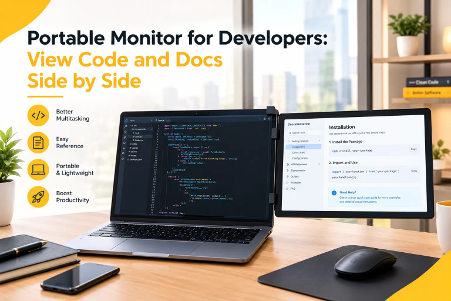
Portable Monitor for Developers: View Code and Docs Side by Side
A portable monitor for developers keeps code on one screen and docs on the other, ending tab chaos for good. Keep reading to learn how this simple setup helps developers code faster, think clearer, and finish projects with less stress.
One research summary found dual-monitor users were 18% more efficient on multi-source tasks. Developers face those tasks every day. They read specs, write functions, and check output in turns. A single laptop screen makes that hard. Windows overlap and tabs pile up. A portable monitor for developers fixes this fast. Anyking builds slim screens for this exact need. This guide shows how to set up a clear coding desk with code and docs side by side.
Why Developers Need a Portable Screen While Coding
Coding is rarely a one-window job. A developer reads an API guide, edits a file, and runs tests. Each task needs its own room. A small display squeezes all three into one view. Focus suffers fast.
Here are the usual pain points on one screen:
- Constant tab switching breaks the train of thought.
- Tiny code panes hide long lines.
- Buried documentation forces guesswork.
- Cramped terminals slow down debugging.
These issues look small. Together, they drain energy by noon. Developers then spend more time hunting for windows than solving problems.
Second Screen for Laptop: Less Switching, More Focus
A second screen for laptop work cuts the toggling that drains time. A University of Utah study, covered by the New York Times, linked extra monitors to less window switching. That toggling can cost about 10 seconds every five minutes. Those seconds add up. Across a full week, they become lost hours.
Remote workers often lack a spare display at home. A portable option fills that gap easily.
Dual Monitor for Coding Keeps Context in View
A dual monitor for coding keeps key details in sight. One academic study on developer workstations notes that extra space holds documentation, code samples, and design notes together. Developers no longer memorize what they just read. They glance across and check. That small change makes long sessions feel calmer.
Choose the Right Portable Monitor for Your Coding Desk
Not every screen suits a developer. A good pick balances size, weight, and connection type. It should also keep text sharp for hours.
Portable Monitor for Laptop: Size and Weight
Size matters when you travel. A portable monitor for laptop use should slip into a bag with ease. An anyking 14 inch monitor matches most laptop screens and sits comfortably beside them. Frequent travelers may prefer an ultra light portable monitor, which adds almost no weight to a daily carry. Bigger screens show more code. Smaller screens travel better. Pick the balance that fits your habits.
Portable Monitor USB C: One Cable, Fast Setup
A portable monitor usb c model needs just one cable for power and video. That keeps the desk tidy. It also speeds up setup at cafes and coworking spaces. Check the laptop first. Its USB-C port must support video output. Look for DisplayPort support in the specs.
Portable Monitor 1080p: Crisp Text for Long Sessions
Text clarity matters for any monitor for programming. A portable monitor 1080p panel gives crisp text at this size. Small fonts stay readable. Code stays easy on the eyes. Higher resolutions add detail but raise the price. For most coding tasks, full HD works well. The table below sums up what to check before buying.
| Feature | What to Look For | Why It Helps Developers |
| Size | 14 to 16 inches | Fits beside most laptops |
| Weight | Under 2 pounds | Easy to carry daily |
| Connection | USB-C with video support | One cable, quick setup |
| Resolution | Full HD or higher | Sharp code and docs |
| Stand | Magnetic or foldable cover | Stable on any desk |
Build a Dual Monitor Setup for Laptop in Minutes
Setup takes less time than most people expect. A clear plan gets you coding faster today.
Dual Monitor Setup for Laptop: Five Quick Steps
- Place the screen next to the laptop at the same height.
- Connect it with a USB-C cable.
- Open the display settings.
- Choose the extend option, not mirror.
- Drag the screen icons to match their real positions.
That is all. Your dual monitor setup for laptop is ready.
Dual Screen Laptop Extender: Best Layouts for Code and Docs
A dual screen laptop extender works best with a clear layout. Put the code editor on the main screen. Place docs, tickets, or API pages on the second one. Some developers prefer the reverse. Test both and keep what feels natural. A magnetic portable monitor can snap into place and save desk space. It also stays steady while typing.
Try these layouts:
- Code on the left, docs on the right.
- Terminal on the laptop, browser on the portable screen.
- Chat and notes on the second screen, editor on the main one.
Monitor for Programming: Comfort Tips
Comfort keeps developers productive. OSHA advises placing the top of the screen at or slightly below eye level. It also suggests keeping the screen about an arm’s length away. The American Academy of Ophthalmology backs the 20-20-20 rule. Every 20 minutes, look at something 20 feet away for 20 seconds. Lower the brightness in dim rooms. Match the screen to the room, and take short breaks often. Good posture matters too. Sit back, relax your shoulders, and keep your wrists neutral.
Start Coding Smarter with a Portable Monitor on Your Desk Today
A split workspace changes how developers work. Code stays visible. Docs stay open. Focus stays strong. A portable monitor for developers gives that power without a big desk or budget. Start small. Add one screen, test a layout, and adjust it over a week. Most developers notice the difference quickly. Your future self will thank you after the next big debugging session.
Ready to build your setup? Anyking offers slim, travel-friendly screens made for coders on the move. Visit anykingscreen.com to explore the range and find the right fit for your workflow.