5 Tools That Turn Static Product Images Into Shoppable Catalogs
A shoppable catalog is a product image or collection of images where every item becomes clickable, letting a shopper move from looking to buying without hunting for the product elsewhere. Tools like Publitas, Shopify’s shoppable image apps, Instagram Shopping, ThingLink, and Canva’s e-commerce integrations all do this by layering interactive hotspots, tags, or embedded checkout links directly onto otherwise flat product photography.
The gap these tools close is bigger than it sounds. A static lookbook or PDF might look beautiful, but every extra step between seeing a product and reaching its buy button leaks intent. Research into e-commerce funnels has repeatedly linked friction at the discovery stage to abandonment, and interactive imagery removes several of those steps at once. Below are five tools worth knowing, what each one actually does, and where each fits depending on your budget and how you sell.
What Makes an Image “Shoppable” in the First Place
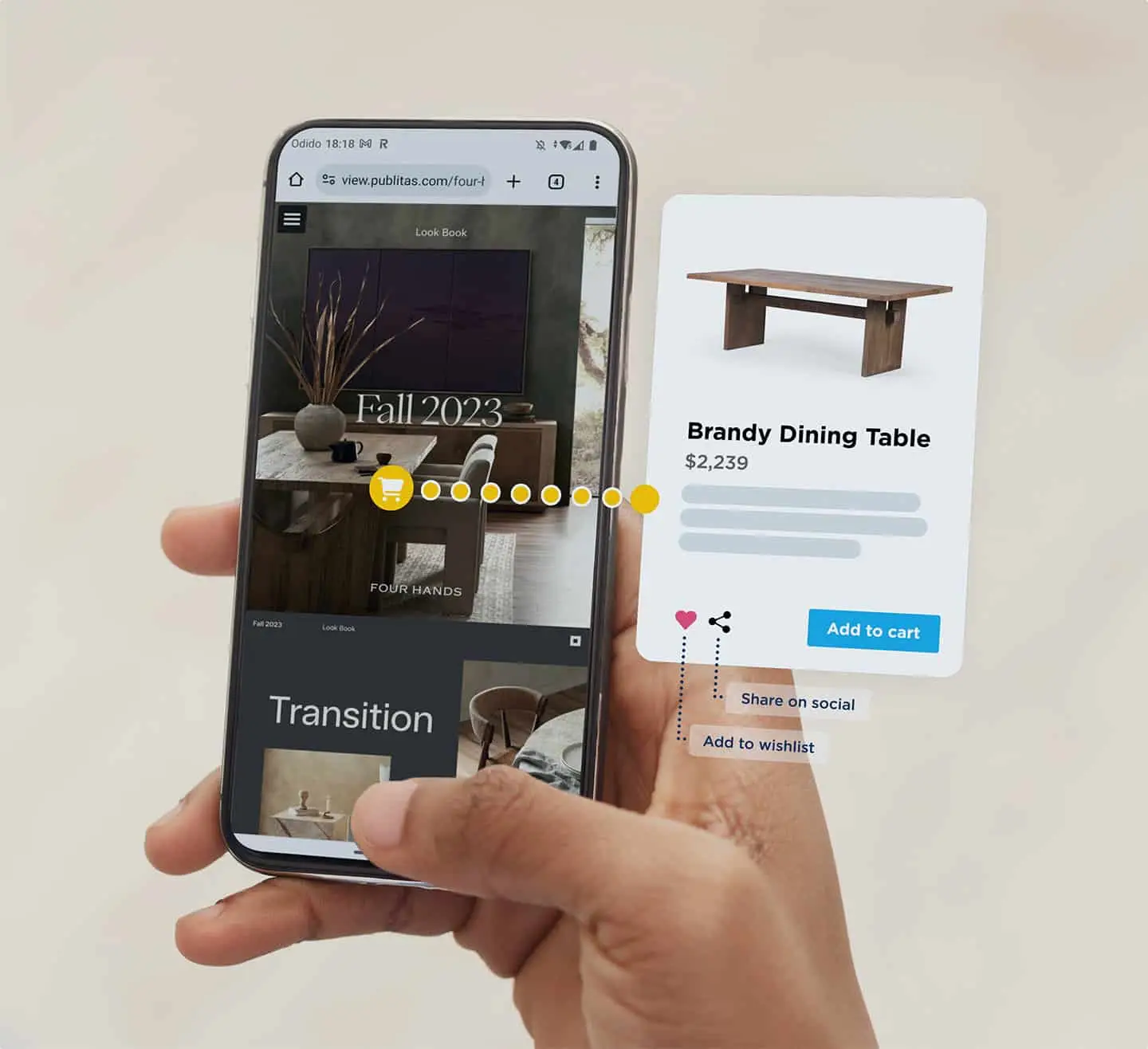
Shoppable simply means the image carries data behind it. When you tag a photo, you attach product information (price, name, availability, a link to the product page or a direct add-to-cart action) to a specific coordinate on the image. A shopper taps the coffee table in a styled living room shot, and a card pops up with the price and a button.
The mechanics vary. Some tools use hotspots, small visible or invisible markers layered over the picture. Others embed a full mini storefront inside the image frame. A few pull live inventory so a sold-out item greys out automatically. The difference matters because a hotspot tool that does not sync with your store means someone has to update prices by hand, and manual updates fall out of date fast.
Cost ranges widely too. Instagram Shopping is free once you meet the platform requirements. A polished catalog platform can run anywhere from around 30 dollars a month for a small merchant to several hundred for enterprise volume. Knowing which end of that range you belong in usually comes down to how many SKUs you carry and whether you need analytics on what people actually click.
Publitas: Turning Print-Style Catalogs Into Interactive Ones
If your brand already thinks in terms of catalogs, magazines, or lookbooks, Publitas sits in a comfortable spot. It takes a PDF or a set of images and converts them into a browsable digital publication where every product becomes tappable, with hotspots that link straight to your store.
The appeal here is aesthetic control. Home goods brands, fashion retailers, and furniture sellers who spend real money on photography do not want to flatten that work into a grid of thumbnails. Publitas keeps the editorial feel of a printed catalog while making it transactional. You can drop a hotspot on a sofa, a lamp, and a rug in one styled room shot, and each opens its own product card.
For a retailer weighing whether a browsable catalog earns its keep, a good starting point is the company’s own explanation of its interactive digital catalog software, which walks through how the hotspot and analytics side works. The analytics matter more than people expect. Seeing which products in a spread pull the most taps tells you what to feature next season, and that feedback loop is hard to get from a static PDF.
Shopify Shoppable Image Apps: Best If You Already Sell on Shopify
For merchants running on Shopify, the path of least resistance is one of the shoppable image apps in the Shopify App Store. Tools in this category let you upload a lifestyle photo, tag products already sitting in your catalog, and embed the result on a homepage, collection page, or blog post.
The big advantage is live sync. Because the app reads directly from your Shopify inventory, prices and stock levels update on their own. There is no separate spreadsheet to maintain, and a discontinued product stops being tappable without you lifting a finger. Pricing usually falls in the 10 to 40 dollars a month band, with free tiers that cap the number of images or hotspots.
This is the right choice when your traffic already lands on your own store rather than on social. A skincare brand running blog content, for instance, can turn a “morning routine” flat-lay into six tappable products inside the article, and every tap keeps the shopper on-site. The tradeoff is that these apps only shine inside the Shopify ecosystem, so if you sell across several platforms you may outgrow them.
Instagram Shopping and ThingLink: The Free and the Flexible
Instagram Shopping deserves a mention because it is free and because it meets shoppers where a huge share of product discovery already happens. Once your account is approved and connected to a product catalog, you tag items in posts, Stories, and Reels, and a tap takes the viewer to a product detail view inside the app. For brands whose audience lives on social, this removes the awkward “link in bio” detour entirely.
The catch is dependence. You do not own the platform, tagging rules change, and the checkout experience is Instagram’s rather than yours. It works brilliantly for reach and impulse discovery, less so when you want full control over the buying journey or detailed first-party data.
ThingLink sits at the other end of the spectrum. It is a general-purpose interactive image and video tool, not built specifically for retail, which makes it flexible in ways the others are not. You can layer text, video, links, and product tags onto a single image, and it works well for catalogs that are as much about storytelling as selling. A plan typically starts around 20 dollars a month. The downside mirrors its strength: because it is not e-commerce-native, you handle the store linking yourself, and there is no automatic inventory sync.
How to Choose Based on Where and How You Sell
The honest answer is that the best tool depends less on features and more on where your shoppers already are. If most of your traffic hits your own Shopify store, a native shoppable app gives you the least friction and the cleanest inventory sync for the lowest ongoing cost. If your brand leans on beautiful, editorial product photography and thinks in catalogs, a dedicated catalog platform preserves that look while adding analytics you can act on.
Budget shapes the decision too. A brand testing the water can start free with Instagram Shopping and validate whether tappable imagery moves the needle before paying for anything. A retailer with hundreds of SKUs and a real content operation will get more from a paid platform that reports on click behavior, because at that scale the data pays for the subscription several times over.
Consider your team as well. A solo founder wants sync and simplicity so nothing goes stale unattended. A brand with a design team can justify a tool like ThingLink, where the extra manual control becomes an asset rather than a chore. Match the tool to who is actually going to maintain it, because the fanciest catalog is worthless the moment its prices go out of date.
The next twelve months are worth watching, because live shopping and shoppable video are pulling the same interactive logic off still images and onto moving ones. If you are choosing a tool now, favour one that already handles video tagging or has it on the roadmap, so the setup you build this quarter still holds up when your best-performing content is a Reel rather than a flat-lay.