Tattoo Stencil Maker vs Image to Outline Converter: Which Tool Should You Use?
Tattoo Stencil Maker vs Image to Outline Converter
Choosing the right software for your art can save you hours of frustration. You might spend a long time trying to fix a blurry line or a dark shadow that should not be there. Many artists and hobbyists get confused when they see different tools for making outlines. You might see one tool labeled for tattoos and another for general drawings. It is important to know which one fits your specific project so you do not end up with a mess on your paper or your skin.
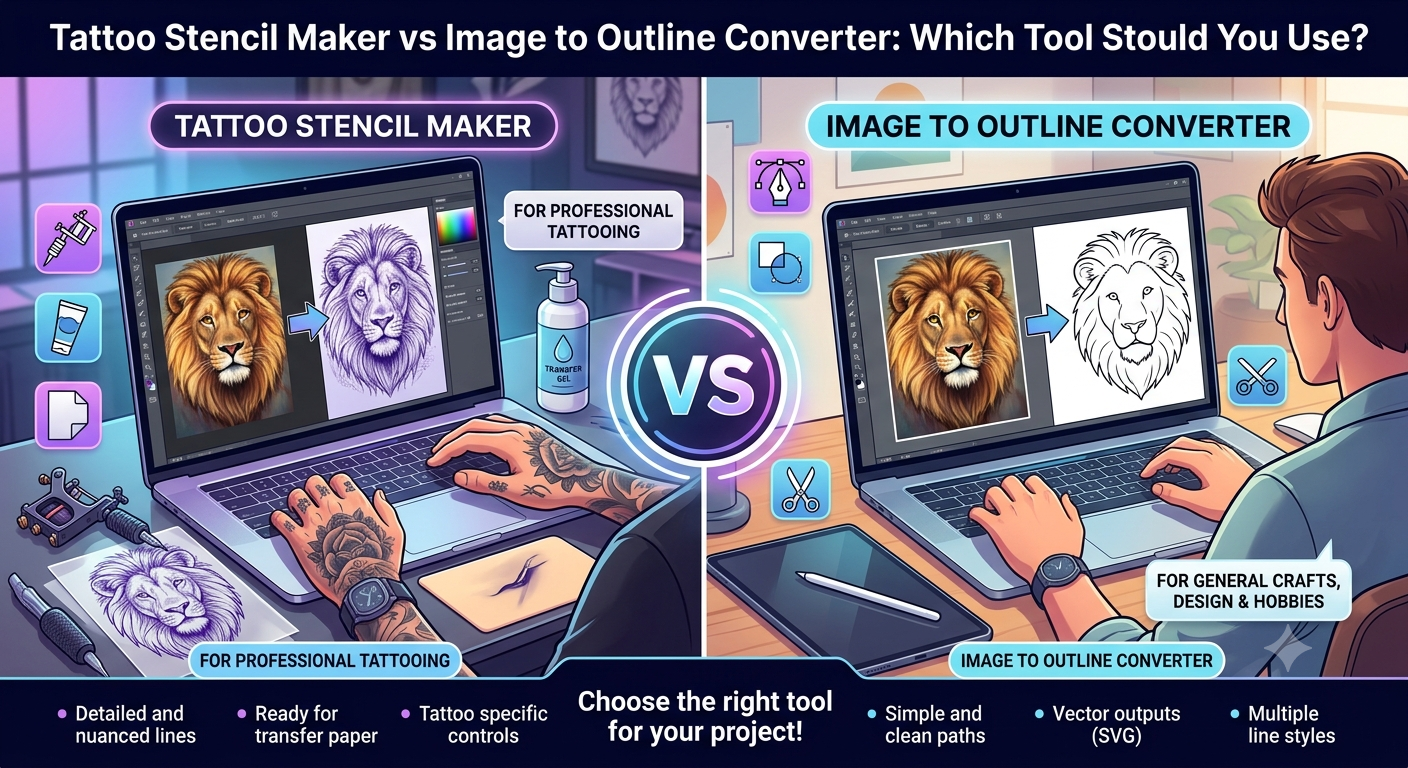
A professional tattoo stencil maker is designed to solve a very specific problem. It takes a regular photo and turns it into a high-contrast map for a tattoo artist to follow. You can use a tattoo stencil maker to ensure that every detail of your design is clear enough for a thermal printer to read. These tools focus on the dark areas and the sharp edges that matter most when you are applying a stencil to someone’s body. They remove the soft shadows that might confuse you during the actual tattooing process.
On the other hand, a general image to outline converter serves a much wider range of needs. This type of software is built to find the edges of any object and turn them into a simple line drawing. You might choose an image to outline converter if you want to create a coloring page for a child or a basic sketch for a school project. It is a great way to simplify a complex photo without needing to know how to use professional design software. These tools are often very fast and give you a clean look that works for many different crafts.
Both tools use smart technology to look at the pixels in your photo. They decide where a line should be based on the change in color or brightness. However, the way they process these lines is different. A tattoo tool wants to create a blueprint for a needle. A general outline tool wants to create a picture that looks good on a screen or a coloring sheet. Understanding these small differences will help you pick the right one for your desk or your studio.
Tattoo Stencil Maker Overview
A tattoo stencil maker is a specialized digital tool that transforms photos into stencil-ready art. In the past, artists had to spend hours tracing photos by hand using lightboxes and carbon paper. This was a slow process and left a lot of room for mistakes. If the artist missed a small detail, it could change the whole look of the tattoo. Modern digital tools have changed this by automating the tracing process with high precision.
These tools are built to handle the unique challenges of tattooing. For example, skin is not a flat white surface like paper. A stencil needs to be very bold to show up clearly on different skin tones. The software looks for the most important structural lines in a photo and ignores the tiny details that would just turn into a blob of ink. It creates a clean, black-and-white image that a thermal copier can process without jamming or overheating.
Key Features
The most important feature of this tool is its ability to manage contrast. You can usually adjust how dark the lines are to make sure they will transfer well to the skin. It also features noise reduction, which removes small dots or graininess from a photo. This is very helpful when you are working with an old photo or a low-quality image. Another key feature is the ability to separate layers, allowing you to see the outline clearly against the original background.
Pros and Cons
Pros
* Created specifically for the needs of professional tattoo artists.
* Produces bold lines that are easy to follow with a tattoo machine.
* Saves a massive amount of time compared to manual tracing.
* Works perfectly with thermal stencil printers and hectograph paper.
* Helps maintain the accuracy of the original design during the transfer.
Cons
* Might be too simple for people who want artistic shading in their outlines.
* Focuses mostly on black and white results rather than colorful sketches.
* Can sometimes lose very fine artistic details in favor of stencil clarity.
Best For
This tool is best for professional tattoo artists, apprentices, and people who are learning how to tattoo at home. It is the right choice if you need to print a design onto stencil paper and apply it to a person’s body. If your goal is to ensure a safe and accurate tattoo session, this is the tool you should reach for.
Image to Outline Converter Overview
An image to outline converter is a versatile tool that turns any photograph into a line drawing. It is not limited to one industry or one type of art. Instead, it uses edge-detection algorithms to find where one object ends and another begins. This creates a sketch-like version of your photo. People use these converters for everything from creating custom logos to making printable activities for students.
These converters are often very user-friendly. You do not need to be a tech expert to use them. You simply upload a photo, and the software does the work in a few seconds. Because they are general-purpose, they often offer more variety in the style of the lines. You might get a thin pencil look, a thick marker look, or even a cartoon-style outline. This flexibility makes them a favorite for hobbyists and digital designers who need a quick starting point for their work.
Key Features
One of the standout features of a general converter is the variety of line styles. You can often choose between different levels of detail, from a very basic silhouette to a complex drawing with many lines. Many of these tools also allow you to export your work in different formats like SVG, which is great for resizing without losing quality. They also tend to have better tools for smoothing out lines, which makes the final result look more like a piece of digital art and less like a technical blueprint.
Pros and Cons
Pros
* Very easy to use for people of all skill levels.
* Offers many different artistic styles for the outlines.
* Great for a wide variety of crafts like wood burning or embroidery.
* Fast processing speeds for quick projects.
* Often free or very affordable for casual users.
Cons
* Lines might be too thin or light for a tattoo thermal printer.
* Does not always handle high-contrast needs as well as a tattoo tool.
* May include too much detail, making the outline look cluttered.
Best For
This tool is best for crafters, teachers, parents, and graphic designers. If you want to turn a photo of your pet into a coloring page, this is the tool for you. It is also perfect for artists who want a basic sketch to paint over digitally. If you are not planning to put the design on someone’s skin, a general outline converter will give you more creative options.
Side-by-Side Comparison Summary
When you look at these two tools next to each other, the differences become clear. One is a specialized piece of equipment for a specific job, while the other is a multi-tool for many jobs. The tattoo tool focuses on the technical requirements of ink and skin. The outline tool focuses on the visual appeal and variety of the drawing.
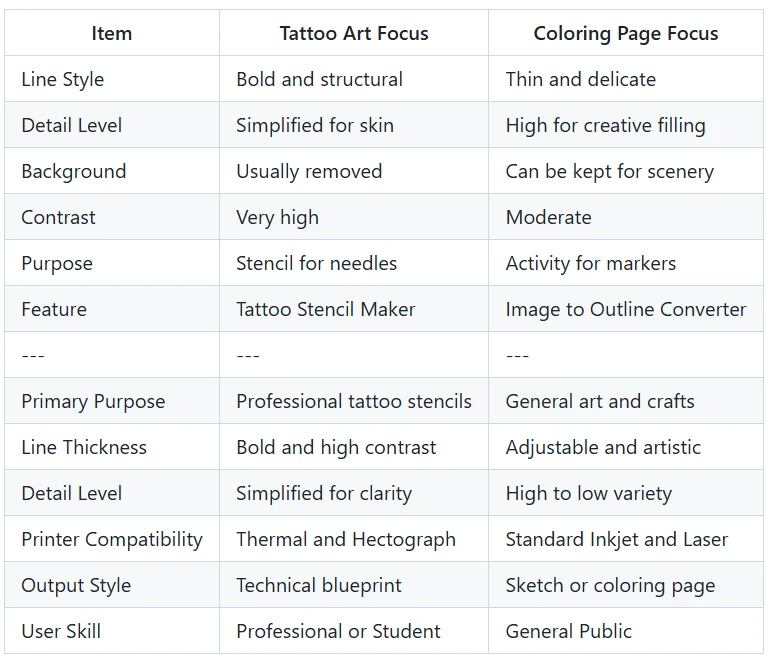
The choice really comes down to what you plan to do with the paper once it is printed. If that paper is going to be used to guide a needle, you need the boldness of the tattoo tool. If that paper is going to be colored with crayons or used as a template for a wood carving, the general converter is the better path. Both tools save you from the boring work of tracing by hand, but they deliver very different final products.
Final Recommendation
If you are a tattoo artist, you should use a tattoo stencil maker. There is no substitute for a tool that understands the specific needs of your craft. It will save you from the headache of stencils that are too light to see or too dark to follow. The time you save on tracing can be spent focusing on your technique and your clients.
If you are a hobbyist or a designer working on non-tattoo projects, you should use an image to outline converter. You will appreciate the extra artistic options and the ability to create different types of line art. It is a fun and easy way to turn your favorite photos into something new and creative.
No matter which tool you choose, digital conversion is a massive help for any creator. It allows you to move from an idea to a finished outline in a fraction of the time it used to take. By picking the tool that matches your specific goal, you ensure that your final project looks exactly the way you imagined it. Stop tracing by hand and let these smart tools do the heavy lifting for you.