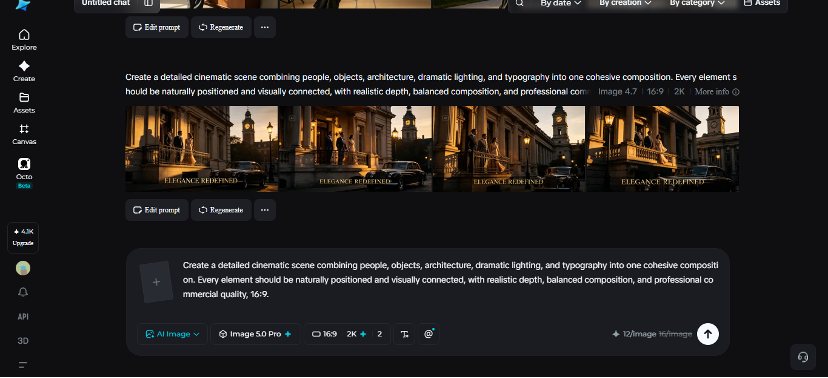
How to Create Complex Compositions with AI
When building a complex image, it’s not as much about adding all you can think of and as much as it is about ensuring that each element complements the others. An AI image generator can assist in positioning people, items, locations, lighting, and lettering into a single cohesive image. Seedream 5.0 Pro, the newest and the most advanced image generation model of Dreamina, helps you to take your creative vision through to the development of a detailed composition without losing coherence.
The design should be organized around a visual hierarchy
Know what you want people to see first before you create anything. In a busy composition, the subject should be obvious, the supporting elements be nonexceeding and the background be prominent.
Consider the scene in terms of foreground, main foreground, background and distant background. This will provide your prompt with a logical structure and keep it from having elements that are unrelated vying for attention.
Organize disorganized thoughts into one shot
Complex ideas may have multiple ideas within them. Maybe you’re looking for a designer, product samples, sketches, lighting equipment and a fun future studio in one frame. Rather than listing items out of order, explain the connection of each item to the others.
Useful details include:
- The location of each topic
- The activities of the people
- Which items need to be highlighted
- The placement of the camera in the shot.
- The placement of the camera in the shot.
Balance people, objects and space
A professional designer, standing next to the large presentation board, tells a viewer something about the setting. Objects are then not just decoration, but they help reinforce the story.
Include deliberate negative space as appropriate. It can help bring a lot of elements into a scene and calm it down, and it can provide breathing space for the important elements of a scene.
Find out what seedream 5.0 pro has to offer
Dreamina’s Seedream 5.0 Pro is designed to facilitate detailed visual creation and controlled editing. It offers such precision tools as point selection, lasso selection and sketch guidance, as well as regional controls, so that creators can select specific sections of a creation.
The model also features smart subject, background, text and effect separation into layers, which can be edited. Its native text generation is available in 14 different languages, and built-in online research can enable relevant visual concepts to incorporate current information. 2K output preserves fine detail, textures and lighting.
Preplan the camera prior to pressing generate
Tell what the lens will feel like, where the viewpoint is, what the framing will be, and what the depth will be. This assists in creating one visual language. Create the composition in Dreamina.
Step 1: Write a text prompt and/or add reference image.
In Dreamina, create a detailed prompt that describes a human in the described professional field, environment, objects, positions to objects, lighting, camera angle and mood. When you wish for more helpful visual support, you may also add an image to refer to.
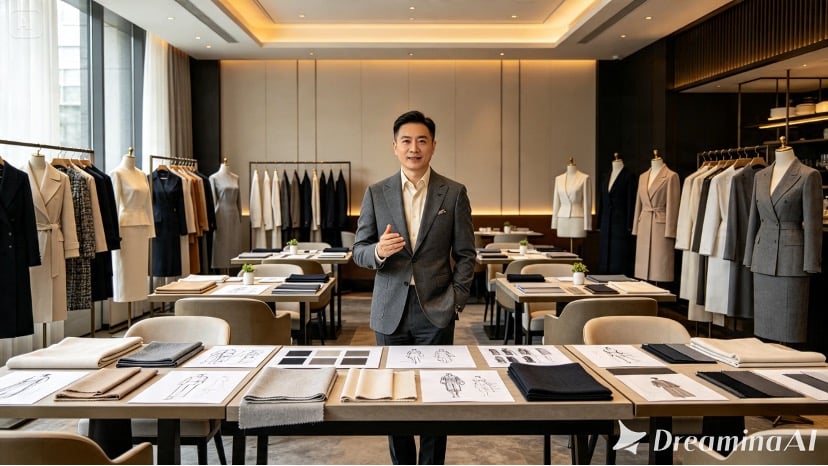
Example: A professional fashion designer is standing in a modern and stylish design studio, engrossed in their work of sketching clothes and creating a mood board. The room is filled with a variety of elements, including fabric swatches, mannequins, a large mood board, a naturalistic depth and believable scale, and warm directional lighting. The scene suggests a dynamic and creative environment, with the designer likely working on a fashion project or design.
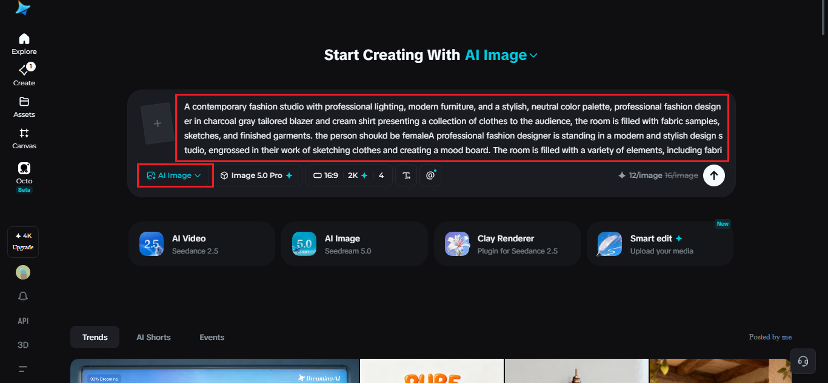
Step 2: Modify parameters and generate
Select the model as Image 5.0 Pro by Seedream 5.0 Pro; then, set the aspect ratio and size as per the use. Use 1K for brainstorming, 2K for a more detailed final product. When all of the above is completed, click on Dreamina’s icon to create the composition.
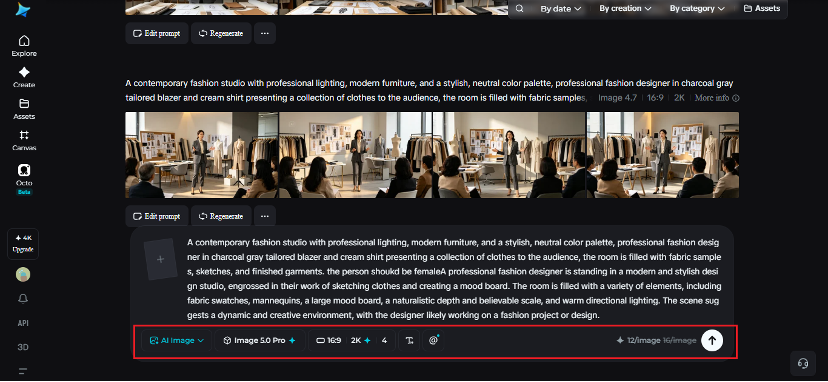
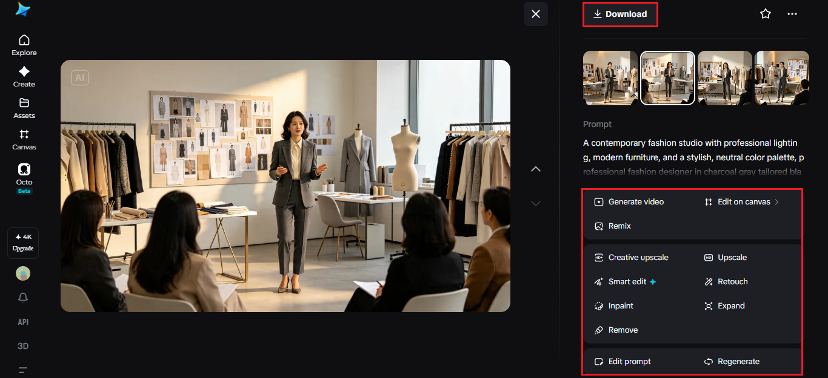
Step 3: Make changes and Download
Even with a strong composition, there could be a distracting object, detail or area that requires additional space. Those problems can be fixed by using customization from Dreamina with its AI. Modify selected areas, expand to enlarge the canvas, remove to cut away unwanted elements and retouch to fix imperfections using inpaint.
Use layers to make the story
Subsequent compositional steps are easier to handle when they can be broken down into individual steps. Adjusting a background won’t affect the subject, and the text or effects can be tweaked on their own.
This flexibility can be helpful for advertising, presentation visuals, editorial concepts and campaign artwork where aspects need to be kept coordinated.
Incorporate text as element of composition
The typography should not be added to the image afterwards without feeling like it’s attached. For posters, signs, product labels or presentation boards, explain what they do and where they are used in your concept. Seedream 5.0 Pro’s multilingual text feature can assist in creating designs with readable text in multiple languages. Use secondary text when it is the secondary subject. When there is a clear hierarchy, the finished image is more comprehensible.
Create a series of images from one composition
After getting a successful one, make one variable different at a time. Change the angle of the camera, lighting, clothing or a slightly different setting, but retain the basic visual style. This can be used to develop coordinated campaign images, storyboards, concept sheets, and video frames. It is easier to be consistent if all the variations are based on a solid visual structure.
Let complexity support the idea!
The more a complex composition communicates, the more it should do it. Each person, object, shadow, colour or text element should be relevant to the central concept. If it is not necessary, you can remove it and the image will be clearer.
That’s made easier with the combination of detailed generation and targeted editing and flexible visual control with Dreamina and Seedream 5.0 Pro. You can create complex scenes when designing a campaign, creating a creative concept, or setting up frames for AI video without compromising the structure within the scene. Use starting points of the story and allow each element to clearly merit its inclusion.