MUNBYN Thermal Printer: What to Know Before Choosing a Thermal Label Printer
Printing labels may seem like a simple task until an online store starts processing dozens or hundreds of orders every day. Ink cartridges run out, paper jams interrupt workflows, and conventional printers often take more space than a small business wants to dedicate to shipping.
Thermal printing offers a different approach. By using heat rather than liquid ink or toner, thermal printers can produce labels quickly with fewer consumables to manage. For online sellers, retailers, warehouses, and home-based businesses, this can make everyday printing considerably easier.
Among the brands serving this market, MUNBYN thermal printer products have become an option for businesses looking for compact label-printing hardware. But before choosing any thermal printer, it is worth understanding how the technology works, what features actually matter, and which type of printer makes sense for a particular workflow.
What Is a Thermal Printer?
A thermal printer creates an image by applying heat to specially coated material or by transferring ink from a ribbon onto the printing surface. The two main technologies are direct thermal and thermal transfer.
Direct thermal printing uses heat-sensitive labels. The print head heats selected areas of the label, creating text, barcodes, or graphics without requiring ink cartridges. This makes direct thermal printers particularly convenient for shipping labels, receipts, temporary identification labels, and other applications where long-term exposure to heat or sunlight is not a major concern.
Thermal transfer printing uses a ribbon between the print head and the label. The heat transfers the ribbon’s ink onto the material, making it suitable for applications requiring longer-lasting labels.
Most shipping label printers used by online sellers rely on direct thermal technology because shipping labels are generally intended for relatively short-term use.
Why Thermal Printing Works Well for Small Businesses
A small business may not need a large office printer, but it still needs reliable printing equipment.
Consider an online seller processing orders from a home office. Each shipment may require a shipping label, return label, product sticker, barcode, or packing-related document. A conventional inkjet printer can handle these tasks, but maintaining ink supplies and switching between different paper sizes can become inconvenient.
Thermal printers simplify this process. They are designed around specific label sizes and can print without traditional ink cartridges. Their compact footprint also makes them practical for desks where space is limited. For businesses that ship products regularly, the benefits can add up:
- Less dependence on ink cartridges
- Fast label production
- Compact desktop designs
- Easy integration with shipping workflows
- Support for barcodes and text
- Reduced printing interruptions
The result is not necessarily a more sophisticated printing system. It is often a simpler one.
What Should You Look for in a Thermal Label Printer?
Not every thermal printer is designed for the same workload. Before buying one, consider several hardware and usability factors.
Print Resolution
Resolution is usually expressed in DPI, or dots per inch. A 203 DPI printer is often sufficient for standard shipping labels, addresses, and common barcodes. A 300 DPI model can produce finer details and may be more appropriate for smaller text, detailed graphics, product labels, or applications where print clarity is especially important.
For most shipping tasks, maximum resolution is not necessarily the most important specification. The right choice depends on what you print and how small the information needs to be.
Printing Speed
If you only print a few labels per week, speed may not matter much. For a business processing dozens or hundreds of orders, however, printing speed becomes part of the workflow. A printer that can consistently produce labels without frequent pauses can save time during busy fulfillment periods.
It is also worth considering whether the printer maintains consistent performance over a longer print run rather than focusing only on a manufacturer’s maximum speed specification.
Label Compatibility
A thermal printer is only useful if it works with the labels you actually need. Shipping labels are commonly available in formats such as 4 × 6 inches, while businesses may also use smaller product labels, barcode labels, address labels, or customized stickers.
Before purchasing a printer, check its supported label width and whether it works with the label materials and formats required by your business.
Connectivity
Modern businesses rarely operate from a single computer. A shipping station might use a Windows PC, Mac, smartphone, tablet, or multiple devices. Depending on the model, thermal printers can support connections such as USB, Bluetooth, Wi-Fi, or AirPrint.
Wireless connectivity can be particularly useful when a printer needs to be shared between devices or placed away from the main workstation.
However, wired USB connectivity can still be valuable. It tends to offer a straightforward connection with minimal configuration, making it a useful option for a dedicated shipping computer.
Where a MUNBYN Thermal Printer Can Fit Into a Business Workflow
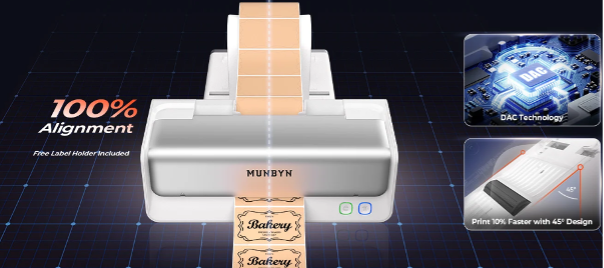
MUNBYN focuses on printing hardware designed for practical business applications, including shipping and product labeling.
Its printer lineup includes different models intended for different connectivity and printing requirements. Exploring the MUNBYN thermal printer collection can therefore be useful when comparing options rather than choosing a printer based solely on brand or appearance.
For example, an online seller who primarily prints 4 × 6 shipping labels may prioritize speed, compatibility, and simple setup. A retailer producing product labels may care more about print resolution and label flexibility. Another business may prefer wireless printing because several employees need access to the same printer. The right printer is ultimately determined by the workflow around it.
Thermal Printing for E-Commerce and Shipping
The growth of online selling has made shipping label printing a routine part of running a business.
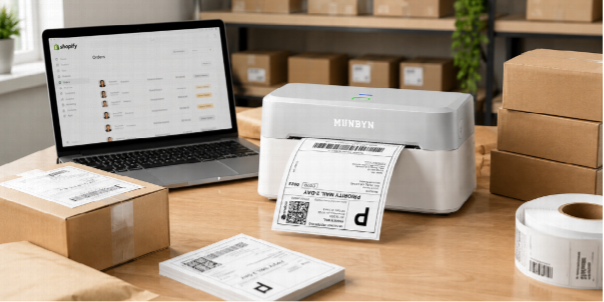
Platforms such as online marketplaces and e-commerce stores generate shipping information that needs to become a physical label. A dedicated thermal printer can turn this information into a ready-to-apply label without requiring standard letter-size printer paper.
This is particularly helpful for businesses operating from small spaces. Instead of printing a full sheet and cutting or separating labels, a dedicated label printer is designed around the task. The shipping station can therefore become more streamlined:
Order received → Shipping information generated → Label printed → Package labeled → Shipment dispatched
When hundreds of orders pass through this process, reducing small inefficiencies can make a noticeable difference.
Thermal Printers Aren’t Only for Shipping
Shipping labels are one of the most common applications, but thermal printing has a much broader range of uses.
Small businesses can use thermal printers for:
- Product labels
- Barcode labels
- Address labels
- Inventory identification
- Warehouse labels
- Retail labels
- QR code labels
- Organization labels
- Event or temporary identification
For a growing business, this flexibility can be useful because printing requirements often change as operations expand.
An online seller might start with shipping labels and later need barcode labels for inventory. A small retailer may use labels for products while also requiring receipts or other printed information. Having dedicated printing hardware can help separate these tasks from general office printing.
MUNBYN and the Small-Business Printing Environment
The best printing hardware is rarely the one with the longest specification sheet. It is the one that fits naturally into the environment where it will be used.
For a small business, that might mean a compact printer that stays next to a packing table. For a home-based seller, it may mean wireless connectivity and a small footprint. For a warehouse, reliability and consistent output may matter more than portability. This is where choosing a printer as part of the overall workflow becomes important.
MUNBYN offers a range of printing and business hardware for applications such as labeling, shipping, retail, and barcode identification. The broader MUNBYN product range can be considered when a business needs more than a single label printer.
Rather than treating the printer as an isolated piece of hardware, businesses can consider how it fits with scanners, inventory systems, shipping software, labels, and other equipment.
Final Thoughts
A thermal label printer should be chosen based on the work it needs to perform, not simply its advertised specifications.
MUNBYN is one option for businesses exploring dedicated thermal printing hardware, with a range of models aimed at different labeling and connectivity requirements. Whether the priority is straightforward shipping-label printing, higher-resolution output, or a more flexible wireless setup, comparing the available specifications against the actual workflow is the best way to make an informed decision.