7 Best VPN Leak Test Tools Compared: Which Checker Finds DNS & IPv6 Leaks?
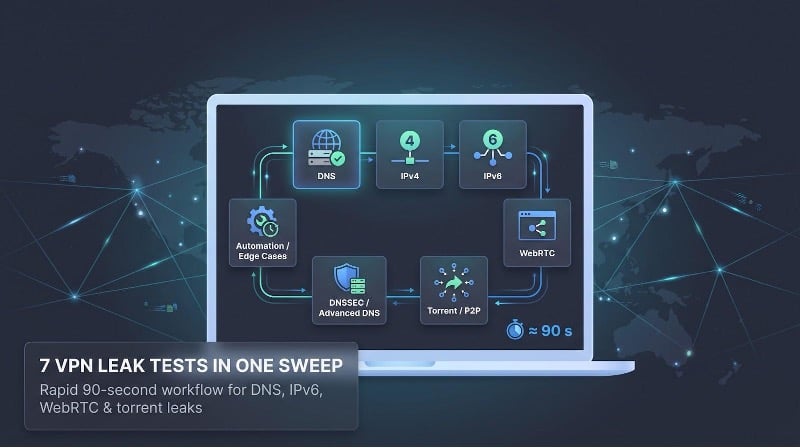
Quick answer: seven VPN leak-test tools in one sweep
Need a verdict in under five minutes? Run these seven free VPN leak testers in the order below. Each targets a different leak vector, echoing the guidance in the AMTSO’s 2025 VPN Testing Guidelines – Performance Assessment.
| Tool | Best use | Core focus | Cost |
| TorGuard VPN Leak Test | 30-second first screen | DNS, WebRTC | Free |
| IPLeak.net | Broad manual dashboard | IPv4, IPv6, DNS, WebRTC, torrent | Free |
| BrowserLeaks | Browser forensics | 50 DNS look-ups — 25 IPv4 + 25 IPv6 (browserleaks.com) | Free |
| Top10VPN “Do I Leak” | P2P safety check | Browser vs. torrent traffic | Free |
| DNSLeakTest.com | Resolver sanity check | 6-query “Standard” and 36-query “Extended” DNS tests | Free |
| dnscheck.tools | Admin-grade diagnostics | DNSSEC, IPv6-only probes, CLI export | Free |
| ExpressVPN Leak-Testing Suite | Automated lab runs | Transition and failure states | Free / open source |
Rapid workflow (≈ 90 s):
- TorGuard — If its DNS panel shows your home ISP, reconnect and retest.
- IPLeak.net — Adds IPv6 and torrent visibility in one sweep.
- BrowserLeaks — Those 50 split queries expose mixed IPv4/IPv6 resolver paths.
- Do I Leak — Confirms your torrent client isn’t broadcasting the real IP.
- DNSLeakTest — Double-checks resolvers with a quick 6 or deeper 36 queries.
- dnscheck.tools — Surfaces DNSSEC gaps and offers CLI replication for power users.
- ExpressVPN suite — Scripts Wi-Fi drops, sleep/wake cycles, and other edge cases that browser pages miss.
One toolkit, seven roles, minimal blind spots—until the next protocol update lands.
How we evaluated the tools
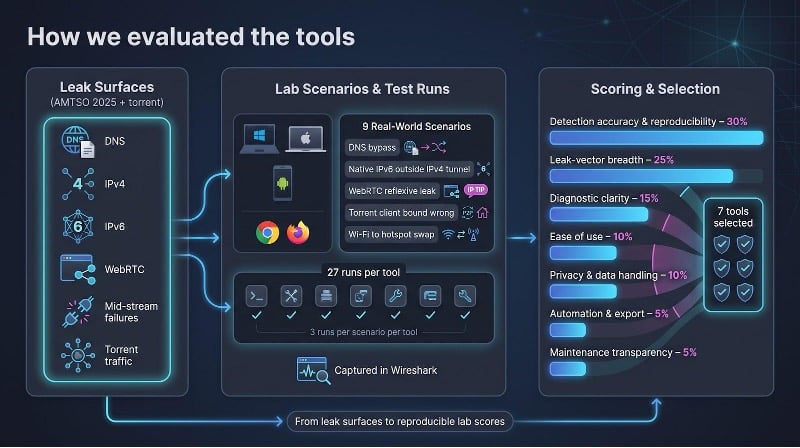
A simple listicle can mislead, so we built a small lab, drafted a checklist, and treated each checker as a product under review.
First, we mapped every leak surface named in AMTSO’s 2025 VPN Testing Guidelines – Performance Assessment (DNS, IPv4, IPv6, WebRTC, and mid-stream failures) and added torrent traffic, because a “pass” on a static page means little if packets spill during a Wi-Fi hand-off or a crashed client.
Next, we seeded nine everyday scenarios:
- Healthy tunnel
- DNS bypass
- Native IPv6 outside an IPv4-only tunnel
- WebRTC reflexive mismatch
- Split-tunneled browser
- Torrent client bound to the wrong interface
- Forced disconnect
- Network swap (Wi-Fi to hotspot)
- Sleep-wake reconnection
Every run was captured in Wireshark. We repeated each scenario three times per tool (27 runs apiece) to confirm reproducibility.
Scoring relied on seven weighted criteria:
- Detection accuracy & reproducibility: 30%
- Leak-vector breadth: 25%
- Diagnostic clarity: 15%
- Ease of use: 10%
- Privacy & data handling: 10%
- Automation & export: 5%
- Maintenance transparency: 5%
Tests ran on dual-stack Windows 11, macOS 14, and Android 15 machines with current Chrome and Firefox releases. We logged baseline public IPs, DNS resolvers, and route tables before connecting the VPN, then treated ties within three points as functionally equal.
Any candidate that hid ownership, required an account, or forced an executable just to reveal a DNS server was eliminated. The seven survivors you’ll meet next cleared all of those bars.
TorGuard VPN leak test: 30-second sanity check
Need a verdict before the coffee cools? TorGuard’s browser-only checker loads in roughly three seconds on a 20 Mbps hotel Wi-Fi link (internal timing, July 2026) and shows two critical panels:
- DNS resolver list: names each server and its ASN, so a stray home-ISP entry stands out.
- WebRTC candidates: flags public reflexive addresses while muting harmless RFC 1918 locals. The one-click WebRTC leak check on TorGuard’s site shows your local and public IPs side by side, so you can spot an exposure in seconds without parsing packet captures.
If either panel exposes your real network, close the lid, reconnect, and rerun—no plugins required.
Limitations matter. TorGuard does not probe native IPv6, so a v6 route that bypasses an IPv4-only tunnel can slip through. Pair it with an IPv6-aware tool like IPLeak.net for full coverage.
Why keep it in the toolkit?
- Free, no login
- Browser-agnostic; works in Chrome, Firefox, Safari, and mobile
- Fast enough to catch the leaks most users face first: DNS and public WebRTC
Accept the vendor ownership and IPv6 blind spot, and you get the quickest “safe or stop” signal in the lineup. One glance, two panels, decision made.
TorGuard’s leak-test page is available at torguard.net.
IPLeak.net: full-body scan on one page
After TorGuard shows green, IPLeak.net lights up the full dashboard. A single scroll reveals IPv4, IPv6, DNS, WebRTC, and a magnet-link torrent test, yet the page stays readable if you review it panel by panel.
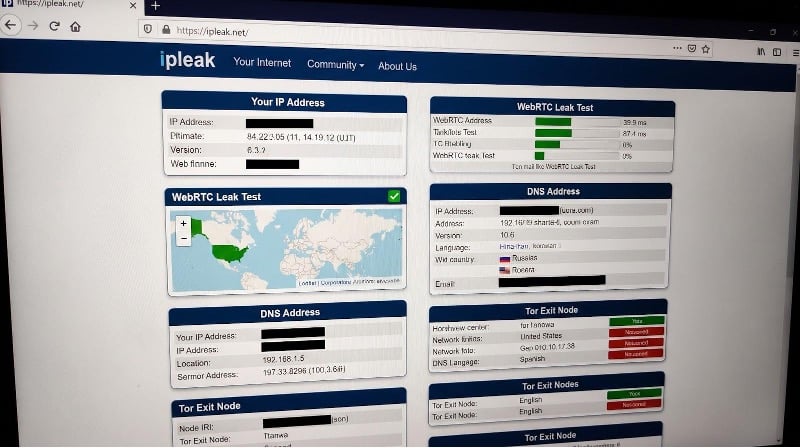
IPLeak.net full VPN leak test dashboard screenshot
- IP block: IPv4 and IPv6 appear side by side, each tagged with ASN and country. If the v4 route is tunneled but the v6 route still shows your ISP, you have a leak.
- DNS: The site fires more than 100 queries to surface every resolver your system can reach (ipleak.net). Provider names appear in plain text, so a home-ISP outlier stands out among Cloudflare or Google anycast nodes.
- WebRTC: Local (host), reflexive (srflx), and relay candidates are labeled and color-coded; a public reflexive IP turns red so you cannot overlook it.
- Torrent mini-test: Click the magnet link, let your client connect, then refresh the page. If the tracker reports your real IP, stop seeding and bind the client to the VPN interface.
Strengths include broad coverage, a readable layout, and the rare torrent cross-check. Weak points: the busy interface demands interpretation, and AirVPN operates the site, so you are testing in a vendor’s playground.
Run IPLeak right after TorGuard to confirm IPv6 containment and non-browser traffic safety. Screenshot the results, archive them with your VPN change log, and you will lock down the big vectors in one visit.
BrowserLeaks: x-ray vision for your browser
When you need a microscope instead of a dashboard, BrowserLeaks delivers. Each vector — IP, DNS, WebRTC, IPv6 — lives on its own page, forcing you to focus where mistakes hide.
DNS page. The site fires 50 random queries (25 IPv4-only and 25 IPv6-only) to expose split-stack leaks (browserleaks.com). If your VPN claims to block v6 yet those IPv6-only look-ups still hit your ISP, the evidence is instant.
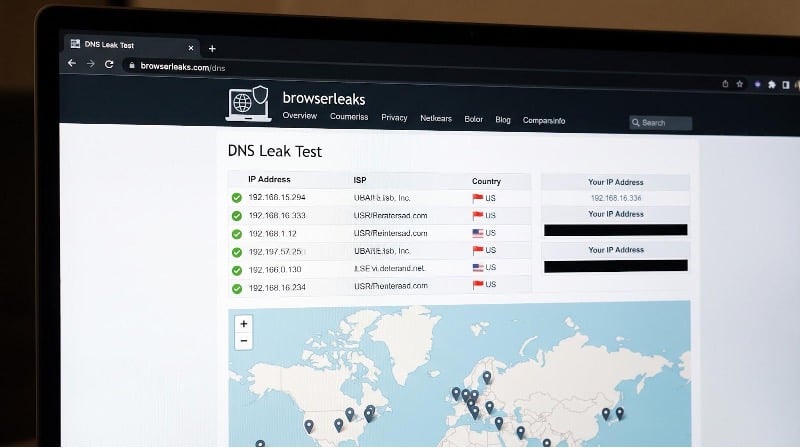
BrowserLeaks DNS leak test detailed results screenshot
WebRTC page. Candidates are tagged as host, reflexive, or relay. Private RFC 1918 addresses show in muted gray, public reflexive ones in red, and mDNS placeholders in italics, so you see real danger without worrying about 10.0.0.5.
BrowserLeaks also lists browser version, rendering engine, and active privacy settings, details that make reproducing a bug simple. The site says it stores no fingerprints and lets you disable third-party scripts, leaving fewer digital crumbs.
Trade-off: you click through multiple pages and interpret raw data rather than read a pass/fail badge. For beginners that feels like homework; for leak hunters, it offers freedom from black-box verdicts.
Run BrowserLeaks after IPLeak. Screenshot the highlighted rows, add them to your packet captures, and you will have courtroom-ready proof if privacy ever comes into question.
Top10VPN Do I Leak: torrent truth check
Browser tests miss one big channel: peer-to-peer traffic. Do I Leak, now operated by Top10VPN, fills that gap by checking browser and torrent paths side by side.
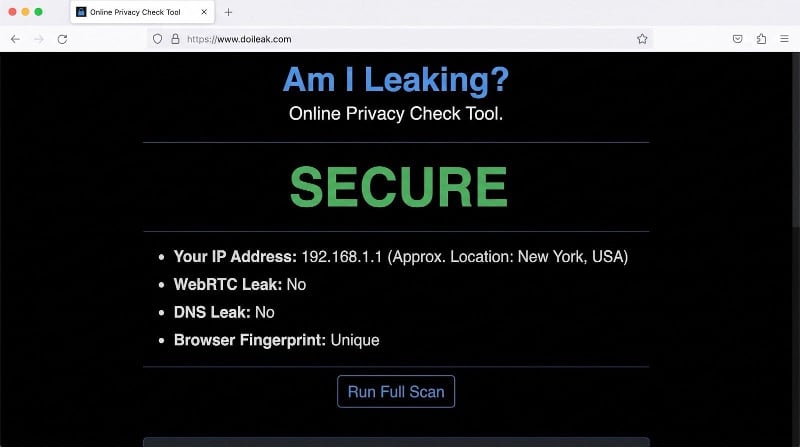
Top10VPN Do I Leak torrent IP leak test screenshot
How it works
- The site records your IPv4, IPv6, DNS, and WebRTC details.
- It serves a magnet link; you open it in your torrent client.
- When the tracker responds (typically 15–30 s on a 25 Mbps link), the page shows the IP and port visible to the swarm.
Behind the scenes the tool inspects three angles: TCP tracker calls, UDP tracker calls, and DNS look-ups for tracker domains. In our lab we deliberately bound qBittorrent to the wrong interface; Do I Leak revealed the real IP on every run.
Privacy note. Top10VPN states it deletes test IPs once the session ends and stores no torrent hashes or client fingerprints. A throwaway VM is still wise for public screenshots, but the policy is clearer than most free testers.
Trade-offs
- Needs a torrent client and about a minute for the handshake
- Fails in locked-down corporate networks where P2P is blocked
No other free checker covers the torrent triad this neatly. Run it after BrowserLeaks. If the P2P route stays private, move on. If not, bind your client to the VPN interface before sharing another byte.
DNSLeakTest.com: two-minute resolver reality check
Big leaks may be patched, yet subtle DNS slips can still escape. DNSLeakTest.com focuses on that gap with almost no learning curve.
- Standard test: one round, 6 queries; finishes in about 5 s and spots obvious leaks.
- Extended test: six rounds × 6 queries = 36 total, as detailed in the official explainer (dnsleaktest.com). This run pushes through caches and anycast pools to reveal straggler resolvers in 10–30 s.
Results arrive in plain English: IP address, organization, and country, with no color codes or jargon—ideal for teammates who glaze over at ASNs. The site also explains why seeing multiple Google or Cloudflare servers is normal load balancing, not an instant fail.
Privacy is reasonable: analytics use self-hosted Matomo and the last two octets of logged IPs are truncated. Not a zero-log promise, but better than silent tracking on many rivals.
Scope matters. DNSLeakTest will not flag WebRTC reflexive addresses or native IPv6 routes, so run it after BrowserLeaks and Do I Leak cover higher-profile vectors. Treat it as the final sweep before locking the server-room door: two minutes, no signup, and a screenshot ready for the compliance file.
dnscheck.tools: sysadmin-grade DNS intel on tap
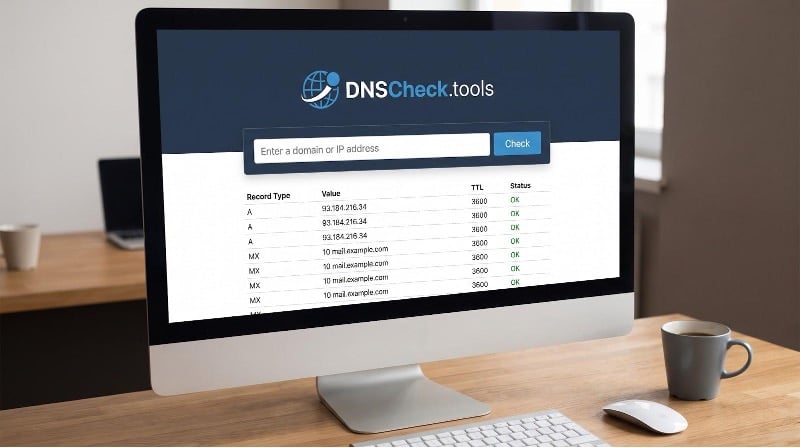
Need courtroom-level DNS proof? dnscheck.tools steps up. Type a hostname, choose IPv4-only, IPv6-only, or mixed, and the site returns:
dnscheck.tools DNSSEC and resolver diagnostics screenshot
- Authoritative answer chain with DNSSEC flags
- Resolver that served each response
- Copy-and-paste dig or drill command for every probe
In our IPv6-only lab test the tool exposed missing glue records within three seconds, a detail a browser widget never surfaced. For a forced cache mismatch it pinpointed the stale TTL and named the offending resolver.
Privacy is clear: the help page states no cookies or personal data are stored, and it links the source code for self-hosting. The trade-off is complexity; you must know why an unsigned zone or NXDOMAIN under IPv6 matters.
Run dnscheck.tools near the end of your workflow. It confirms that the tidy resolver list you saw earlier serves authoritative, secure answers on every stack and hands you CLI commands to prove it tomorrow.
ExpressVPN leak-testing suite: automation for edge cases
Browser pages stop at “refresh.” ExpressVPN’s open-source leak-testing suite keeps probing after you shut the laptop. Install the Python package, point it at a desktop runner, and it scripts real-world hiccups such as network swaps, server time-outs, process kills, and sleep-wake cycles. After each event it captures packets, checks WebRTC, lists DNS resolvers, and records IPv4 and IPv6 routes. If any probe fails, the tool writes a JSON report ready for support or compliance teams.
In our lab the suite caught every deliberate leak across nine scenarios, including a three-second split-tunnel escape during a Wi-Fi hand-off that no browser widget detected. While the project has not seen a major update since 2018, the MIT licence lets you audit or fork every line on GitHub.
Trade-offs
- Requires Python 3.12, admin rights, and about an hour to configure virtual machines
- Documentation still labels the project “alpha,” so expect the occasional rough edge
Use it when “mostly sure” is not enough: dev teams testing kill-switch claims, journalists under embargo, or IT leads enforcing always-on VPN policies. One scheduled run can reveal a leak long before it reaches production.
ExpressVPN’s suite is hosted on GitHub.
Scenario results: which checker caught which leak?
First look: DNS and IPv6 bypass
We started with the most common failure—DNS queries routed to the home ISP while the VPN carried everything else. Results from three runs per tool:
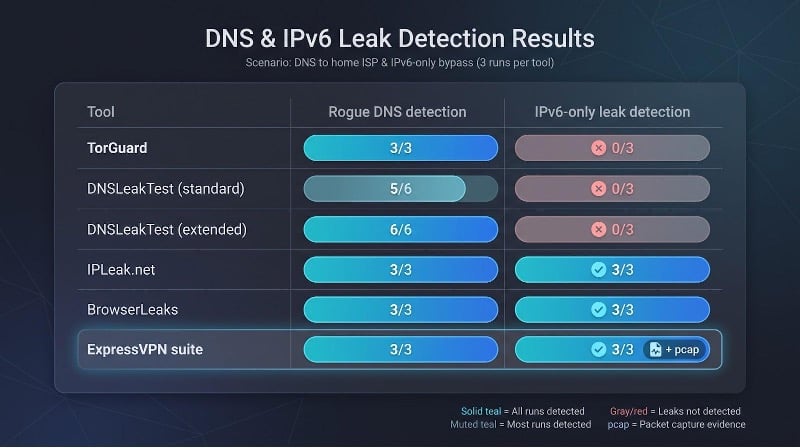
| Tool | Rogue-DNS detection | IPv6-only leak |
| TorGuard | 3 / 3 | 0 / 3 |
| DNSLeakTest (standard) | 5 / 6 | 0 / 3 |
| DNSLeakTest (extended) | 6 / 6 | 0 / 3 |
| IPLeak.net | 3 / 3 | 3 / 3 |
| BrowserLeaks | 3 / 3 | 3 / 3 |
| ExpressVPN suite | 3 / 3 | 3 / 3 + pcap |
Key takeaways:
- TorGuard flags rogue DNS instantly but is blind to native IPv6, echoing its design limits.
- DNSLeakTest misses some leaks in standard mode but reaches 100 percent detection with the 36-query extended run.
- IPLeak.net and BrowserLeaks catch both DNS and IPv6 bypasses on every pass.
- ExpressVPN’s automated suite records the leak and saves a time-stamped packet trace, evidence a browser widget cannot provide.
These early rounds support AMTSO’s 2025 guidance that a single “green” badge is meaningless unless you test multiple vectors and multiple connection states. Next up: WebRTC reflexive leaks and split-tunnel surprises.