Can AI Video Replace B-Roll in Tech Reviews? What Generative Video Gets Right and Where Real Footage Still Wins
Anyone who has produced a hardware review video knows where the hours go. The benchmarks and the writing take time, but the b-roll is the hidden cost: slow pans across a motherboard, a graphics card rotating under soft light, cutaways to a gaming setup, an animated shot of air flowing through a case. Those shots make a review watchable, and they can take as long to capture as the testing itself.
Generative video models now produce clean, cinematic eight-second clips from a text prompt and a few reference images. That raises an obvious question for review channels and tech publishers: how much of that b-roll can be generated instead of filmed, and what happens to trust if it is? This article looks at what current models can realistically do, what they cost, and how to draw a clear line between illustration and evidence.
What modern video models can actually do
The current generation of video models is a long way from the wobbly clips of two years ago. Google’s Veo 3.1 is a good benchmark for where the technology stands. It generates eight-second clips at up to 1080p, with 4K available on some tiers, and produces native audio such as ambient sound and effects alongside the picture. It follows cinematic instructions such as dolly moves, tracking shots and lighting cues closely, and it accepts up to three reference images to keep a subject consistent across shots. Scene extension can chain multiple clips into sequences of more than two minutes.
For a reviewer, that means three kinds of shot are now within reach: atmospheric cutaways, stylised product-in-context scenes and conceptual explainers that would be difficult or impossible to film, such as airflow through a heatsink or data moving through a network.
The line that matters: illustration versus evidence
A hardware review is a promise to the viewer. When you show a product, the audience assumes they are seeing that product. When you show a temperature reading, a frame-rate counter or a screen, they assume it is real. Generated footage breaks that promise if it is used in the wrong place, and once an audience suspects a reviewer of faking shots, the damage is hard to repair.
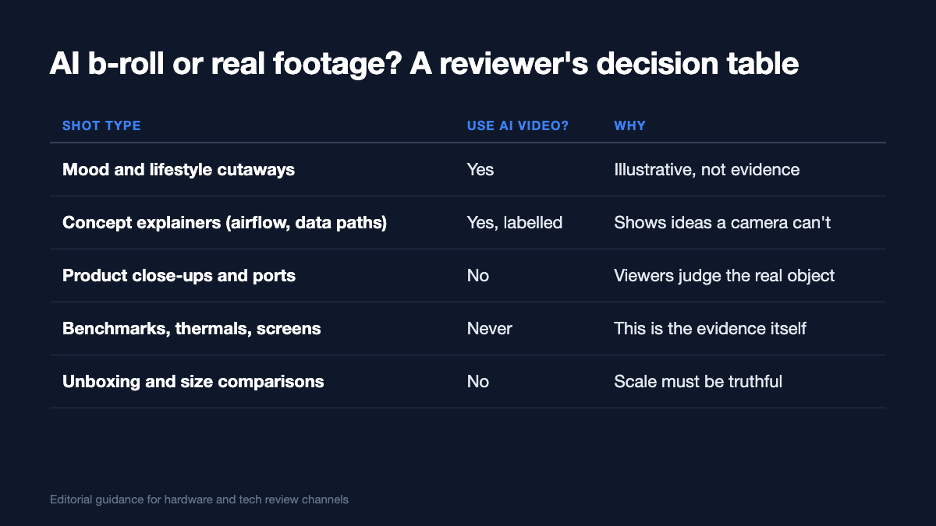
A simple rule of thumb: if the shot is evidence, it must be real.
The decision rule is straightforward. If a shot helps the viewer feel the context, such as a cosy desk setup, a stylised city at night for a router review or a dramatic intro sequence, AI generation is a reasonable choice. If a shot helps the viewer judge the product, such as its build quality, ports, size, screen, noise or performance, it must be real footage of the actual unit you tested. Conceptual explainers sit in between: they are valuable, but they should be clearly labelled as illustrations.
Where AI b-roll earns its place
- Intros and chapter cards. Short atmospheric shots that set tone without making claims.
- Explainers. How a vapour chamber moves heat, how a mesh Wi-Fi network hands off devices, how a CPU scheduler splits workloads. These are diagrams in motion, and labelling them as illustrations is honest and helpful.
- Lifestyle context. A laptop on a café table or a monitor in a home office, used as a transition rather than as proof of anything.
- Cutdowns for social. Vertical teasers for short-form platforms, where the full review is linked and the real footage lives.
What it costs compared with filming
Most video models are priced per clip or per second, with tiers trading speed and quality against price. Using Veo 3.1 as an example, the Veo 3.1 API on APIMart lists three tiers: a lite tier at about seven cents per 1080p clip for quick tests, a fast tier at about fourteen cents for iteration and a quality tier at about one dollar per clip for final shots with native audio. 4K output costs more on every tier.
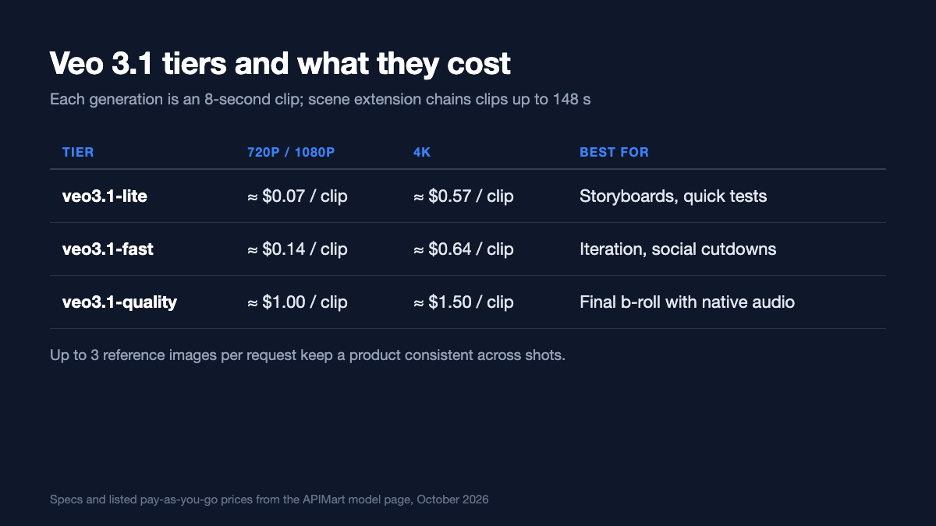
Listed per-clip prices for the three Veo 3.1 tiers, October 2026.
A typical review might use a dozen b-roll cutaways. Exploring each with three fast drafts and rendering one quality final comes to well under twenty dollars in generation costs. Compare that with an afternoon of lighting, shooting and colour-grading product cutaways, and the appeal for small channels is obvious. The saving only holds, though, if the generated shots are limited to the illustrative categories above.
A practical workflow for review channels
- Film the evidence first. Product close-ups, ports, screens, benchmark runs and size comparisons are shot on the real unit, as always.
- Mark the gaps. In the edit, note where the video needs atmosphere, transitions or explanations rather than proof.
- Write shot-specific prompts. Describe camera move, lens feel, lighting and duration. Keep a prompt library so your channel’s look stays consistent.
- Use references sparingly. Reference images help consistency, but avoid generating a near-replica of the product under review, which blurs the line between illustration and evidence.
- Draft cheaply, finish selectively. Iterate on fast or lite tiers and render only the shots that make the final cut on the quality tier.
- Label honestly. Add an on-screen note such as “illustration” to explainer shots and mention AI-generated cutaways in the description.
Audio, consistency and other practical details
Native audio is a mixed blessing for reviewers. Ambient sound can make a cutaway feel finished, but generated audio must never be mistaken for the real product’s fan noise or speaker quality. Mute generated audio under any segment where you are discussing sound performance, and use your own recorded audio for evidence.
Consistency across a series also takes planning. Generated clips can vary in colour and contrast between generations. Grade them alongside your real footage so the video feels coherent, and keep your channel’s prompt and reference library under version control so the look does not drift from one review to the next.
Viewers forgive a plain shot of a real product. They do not forgive a beautiful shot of something that was never there.
What publishers should put in their editorial policy
| Policy point | Suggested rule |
| Product depiction | Only real footage of the tested unit may show the product being reviewed |
| Performance data | Screens, overlays and readings must be captured, never generated |
| Explainers | Allowed if labelled as illustrations |
| Disclosure | Mention AI-generated footage in the description and follow platform labelling rules |
| Sponsored content | Apply the same rules; brands should not supply generated product shots as evidence |
The verdict
AI video will not replace the camera on a review bench, and it should not. What it can replace is a large share of the time spent on atmosphere, transitions and explanations, which are exactly the shots that small teams struggle to produce. Used with a clear line between illustration and evidence, generative b-roll lets reviewers spend more of their time on what audiences actually come for: careful testing, honest opinions and real footage of real hardware.