
Abit AN-M2 Motherboard Review
Overclocking
Contents
Abit AN-M2 has some overclocking options and an extensive memory timings setup screen. Here are the options you will find on Abit AN-M2 (June 5th, 2007 BIOS):
- Base clock (HTT clock): From 200 MHz to 400 MHz in 1 MHz steps.
- PCI Express clock: From 100 MHz to 150 MHz in 1 MHz steps.
- CPU voltage: 1.3 V to 2.0 V in 0.025 V steps.
- Memory voltage: 1.85 V, 1.90 V, 2.00 V, 2.10 V, 2.25 V and 2.55 V.
- Clock multiplier.
- North bridge HyperTransport speed.
In Figure 6, you can see all memory timings adjustments that this motherboard has – far more than necessary, especially for its class.
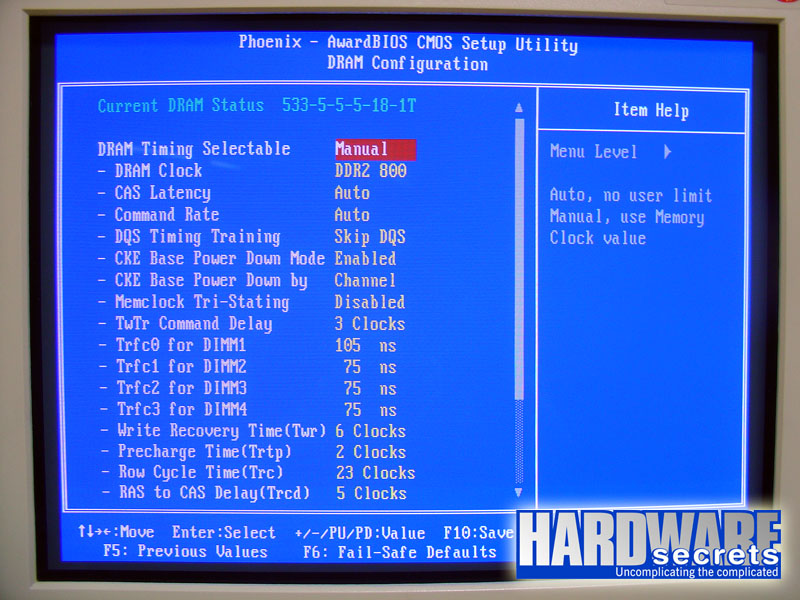 Figure 6: Memory timings adjustments.
The PCI Express clock configuration is very important, as you can lock the PCI Express clock at a given value (100 MHz, for example). Usually when you increase the FSB clock you will automatically increase the PCI Express clock as well, and sometimes your overclocking will be limited not by the CPU but by the devices connected to the PCI Express bus. Thus with this option you can increase the probability of setting a higher overclocking.
On this motherboard we could increase the CPU base clock from 200 MHz to 218 MHz, making our Athlon 64 X2 5000+ to run at 2,834 MHz, a 9% increase over its original clock of 2.6 GHz.
We didn’t play with the voltage configurations, so with time and patience you may achieve a better overclocking with this motherboard.