Making Information Easier to See with an AI Image Generator
Sometimes, a message is difficult to explain with words alone. A small business may need to show how a service works, a teacher may want to introduce an unfamiliar concept, or a freelancer may need a visual that makes a presentation more engaging. In these situations, an image is more than decoration. It helps people understand an idea quickly.
An ai image generator can help turn a written description into a visual starting point. However, the most useful result is not necessarily the most dramatic or detailed image. It is the one that makes the intended message easier to understand.
Identify the Confusion You Want to Remove
Before creating a visual, ask what the audience might struggle to understand. Is the subject unfamiliar? Are several steps involved? Does the reader need to compare two options, or picture an outcome that is difficult to describe? The answer should guide the type of image you create.
For example, a fitness instructor explaining a stretching routine may benefit from a clear illustration of body position. A consultant introducing a complicated service might need a simple scene that represents the problem and its solution. A restaurant promoting a new dish could use a close-up that makes its ingredients and presentation immediately appealing. These examples have different goals, so they should not all use the same visual style. Begin with the communication challenge, then decide how an image could help solve it.
Translate the Message into Visual Details
Once the purpose is clear, turn it into a description that a generation tool can interpret. Include the main subject, setting, visual style, and details that support the message. Suppose you want to illustrate an organised workspace. Rather than requesting a beautiful desk, describe a clean table with a notebook, a laptop, neatly arranged stationery, and soft daylight from a nearby window. These details provide a clearer direction.
It is also useful to state what should be avoided. If the image will accompany an instructional article, you might request a simple background without unnecessary decorations. If it needs to leave room for a heading, specify open space on one side. Keep the description focused. Too many unrelated objects or conflicting style instructions can make the output harder to control. Prioritise the details that help the audience understand the subject.
Choose a Style That Supports Understanding
Different visual styles can communicate different things. A realistic scene may help readers imagine a familiar situation, while a simple illustration can make an abstract topic feel less intimidating. A conceptual image may be useful for introducing a broad theme, but it might not work when precise instructions are required.
When exploring an ai image generator free online, compare the available styles and controls before committing to one approach. Free access may involve limits on credits, image dimensions, editing options, or downloads, so check the current conditions of the platform. Evaluate the results by asking three questions: Is the subject immediately recognisable? Does the style fit the audience? Does the image support the message without introducing confusion? A restrained visual often works better than an elaborate one when the purpose is to explain information.
Check Whether the Image Tells the Right Story
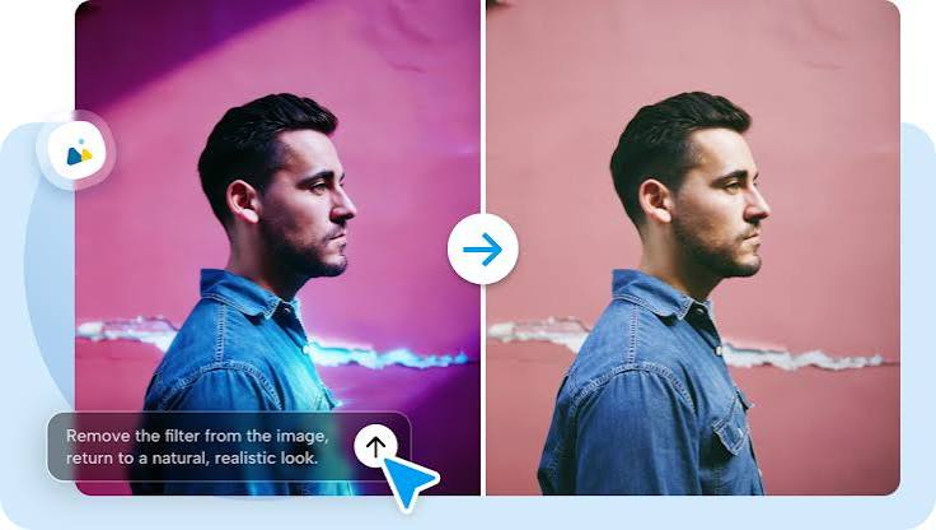
An image can look polished and still communicate the wrong idea. A generated office scene might include equipment that does not belong in the intended setting, or an illustration may suggest an action that the accompanying text never describes. Review the output for accuracy and relevance. Check important objects, the relationship between elements, and any visual details that could be misinterpreted. Pay particular attention to text within the image, since generated lettering may be unclear or incorrect.
Creators can use Dreamina to explore visual concepts and develop an initial direction for content. Whatever platform you choose, treat its output as a draft that needs human review, especially when the image explains a process, represents a real product, or supports educational material. If the image does not communicate the intended point, adjust the description or choose a different visual approach. Do not keep an unsuitable result simply because it looks attractive.
Make the Visual Work with the Surrounding Content
When using an ai image generator free online, remember that an image rarely communicates in isolation. Its placement, caption, heading, and surrounding text all influence how readers interpret it. For an article, choose a visual that prepares readers for the section rather than repeating the heading literally. For a presentation, keep the main subject visible from a distance. For a social post, check whether the image remains understandable on a small screen.
Avoid placing too much text inside the generated image. It is often easier to add accurate headings, labels, or explanatory notes separately using a design editor. This also gives you more control over spelling, readability, and later revisions. Before publishing, confirm that you have the necessary rights to use the source material and that the generation platform’s terms support your intended use.
Learn from the Audience’s Response
The final test is whether the image helps people understand the content. If readers repeatedly ask questions about a visual, the problem may be its composition or the assumptions it makes. Ask a colleague or a small group of intended viewers what they notice first. Find out whether they interpret the image as expected and whether any detail distracts them. Their feedback can reveal issues that are easy to overlook when you already know the subject. Keep notes about successful descriptions and useful visual choices. This makes future projects easier to plan while allowing each new image to respond to a different communication need.
Final Thoughts
An ai image generator is most valuable when it helps people understand an idea, not simply when it produces an attractive picture. Start by identifying the audience’s challenge, describe relevant visual details, choose a suitable style, and check the result for clarity and accuracy. When the image works alongside its caption and surrounding content, it becomes a practical communication tool rather than an extra decoration.