What to Lock Before Your Next AI Video Project (It Isn’t VRAM First)
HardwareSecrets readers already know the trap: you treat the next AI video like a new GPU SKU. More VRAM, more NVMe, a quieter PSU — then the clip still fails because the brief was a mood, the stills disagreed about the product, and the generate happened on a laptop that was never the bottleneck.
Cloud video tools already moved the heavy inference off your desk. That does not mean “start generating.” It means the project decisions moved to the front of the queue: job, kit, duration, crop, and which lane you are buying. Buy silicon after those are written down. Otherwise you are cooling a datacenter with a 4090 you did not need, while the label on the bottle still drifts at second eighteen.
This is not another “Premiere needs 32 GB” spec sheet, and it is not a Seedance 2.0 local-preview diary. Those pieces exist on this site. This is the checklist before you press generate — or before you add a graphics card “for AI video.”
1. Name the job in one sentence
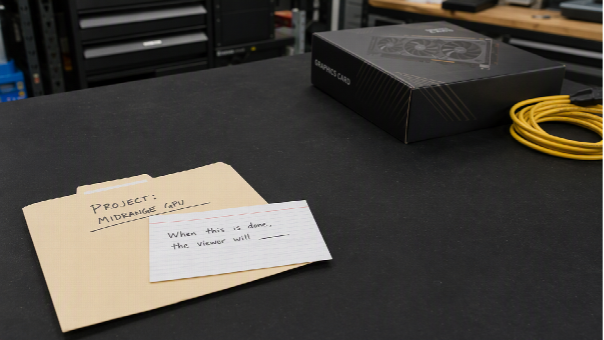
A product proof, a website hero with type, a ten-second sting, and a twelve-minute tutorial are four projects. If you cannot finish the sentence “When this is done, the viewer will ___,” do not open the generator. Hardware will not finish it for you.
2. Decide where compute actually lives
Hosted generation: your machine is a review station. Browser, decode, a couple of comparison exports, maybe a timeline for captions. 16–32 GB of RAM and an NVMe with breathing room still help, because preview and encode still happen locally. They do not replace a clean brief.
Local training or self-hosted weights: that is an AI-server conversation (H100-class VRAM, 128 GB+ RAM, NVMe scratch). Do not confuse it with “I want a 20-second product clip.” Most marketing beats never need that chassis.
If the plan is a laptop and a browser, stop shopping GPUs until the kit folder is honest.
3. Pack a non-conflicting kit (this is the real preflight)
Two lighting setups of the same SKU are an argument. Two firmware UIs are an argument. Music you do not own is a legal argument. Put three files in a folder with jobs: establish, proof, hold. Confirm rights. Then upload.
Bandwidth matters more than CUDA here. A slow link makes “instant AI” feel like a render farm from 2014. Average broadband is usually enough; a metered hotspot is not a production plan.
A timed, kit-locked 15–30 second proof is a model job. Launch motion with kinetic type, six crops, and no After Effects timeline is a studio job. Do not rank those as two graphics cards.
Seedance 2.5 is a multimodal AI video model for coherent clips of about 4–30 seconds from text plus image, video, and audio references, with second-range direction. On Topview, visible export is typically in the 1080p class, with a large still kit. Confirm the live generator. Do not treat “4K-ready” marketing as native output, and do not assume you must run those weights on the PC under your desk. Hosted inference is the point.
Write the beat like a shot list: “0–6s the same packshot; 6–18s label readable; 18–24s three-quarter, same light; 24–30s hold for the URL — no new logo.” If second eighteen grows a necklace, fix the folder. That retry costs credits and time. It does not require more VRAM.
Motion Studio is Topview’s online motion-graphics studio for product launches: describe the message, upload interface or hardware stills (JPG/PNG, about 15 MB per file on the current page), pick style, length, and aspect ratio. Product copy puts duration in the 4–60 second range and six frames (21:9 through 9:16). Templates are still a preview library. Confirm the panel. This is a desk, not a local After Effects GPU tax and not a rival to Seedance 2.5 in the same spreadsheet cell.
If the file is captions, denoise, and a poster, stay in the editor you already have. That is still the last mile.
A 16:9 deck clip squeezed into 9:16 is not “platform optimization.” It is a failed preflight. Set the ratio for the slot — homepage hero, pitch, story — then generate. Leave the last seconds still enough for a URL overlay. Mute autoplay only if the words are on screen.
6. Budget credits like studio hours, not like free electricity
Hosted models bill generation. Local GPUs bill watts, noise, and a chassis you have to cool. Both are real. The cheap failure mode is three vibe prompts and a GPU upgrade. The expensive-looking failure mode that actually ships is one timed brief and two inspect-and-retry cycles.
Watch the same three numbers this site already taught for Seedance 2.0 review sessions: VRAM on the local preview path, system RAM so the OS does not page, NVMe so cache does not thrash. Those metrics still apply after the file lands. They do not decide which model or studio you should have used.
A one-page preflight you can tape to the monitor
| Lock this | Why it comes first |
| One-sentence job | Stops “cinematic” from becoming the spec |
| Cloud generate vs local train | Stops a 4090 purchase for a browser clip |
| Kit + rights + bandwidth | Stops identity drift and upload stalls |
| Model vs studio vs editor | Stops mixing Seedance 2.5 with Motion Studio as one SKU |
| Crop, duration, hold | Stops generating the wrong shape |
| Identity check at midpoint | Stops burning credits on lighting you like |
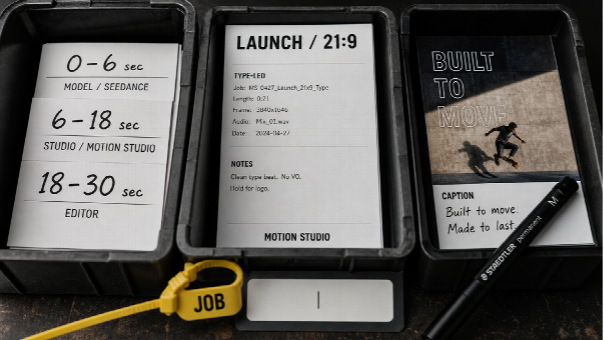
Starting an AI video project on a hardware site used to mean a parts list. It still means a parts list if you are training or previewing until the fans scream. For the clip most people actually need, the parts list is a sentence, a folder, a crop, and a lane.
Seedance 2.5 is the hosted model for a directed 15–30 second proof from a kit. Motion Studio is the hosted studio for a launch sequence without a keyframe timeline. Your GPU still matters for the NLE. It should not be the first line of the brief.