8 Best LMS Platforms With Mobile-Friendly UIs and SCORM Support Compared
Mobile-first learning is the new baseline, yet vendors still insist their platforms are “mobile-ready” and “SCORM-compliant.” To cut through the noise, we sifted through 20 platforms’ 2026 release notes, support docs, pricing pages, and user reviews. We then scored each product against nine weighted factors, with mobile experience (22 percent) and SCORM depth (18 percent) topping the list. The eight best performers made our final cut, and we’ve summarized their strengths, quirks, and current costs so you can pick the right LMS without an expensive trial-and-error phase.
How we ranked the best LMS platforms
We turned common selection pain points into numbers. Each platform could earn up to 100 points across nine weighted factors:
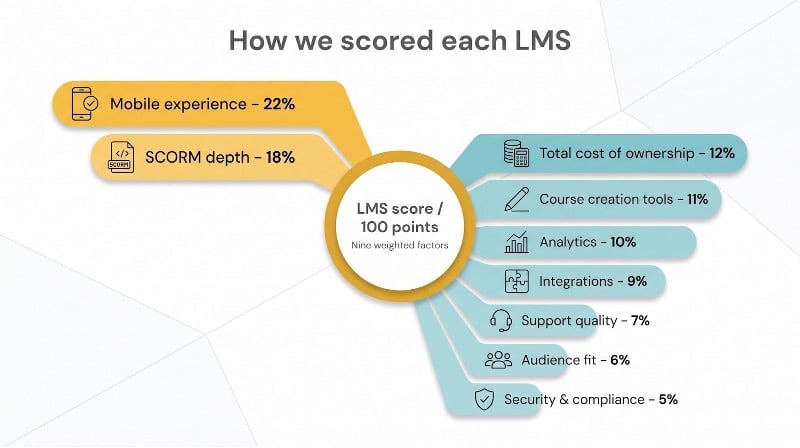
- Mobile experience: 22 %
- SCORM depth: 18 %
- Total cost of ownership: 12 %
- Course creation tools: 11 %
- Analytics: 10 %
- Integrations: 9 %
- Support quality: 7 %
- Audience fit: 6 %
- Security and compliance: 5 %
We pulled scores from published documentation, 2026 release notes, and verified user reviews, then applied a straightforward weighted formula to surface the standouts.
Quick comparison: the eight standouts
If you need the short answer, the table below compares each finalist on mobile delivery, offline SCORM, pricing, and key trade-offs.
| Rank | Platform | Best for | Mobile delivery | Offline SCORM | SCORM versions | Starting price* | Main limitation |
| 1 | GoSkills | Small teams starting free | Responsive web | No | SCORM, xAPI, AICC, cmi5 uploads (Pro) | Free plan; Pro $9.71 per license/mo | No native app |
| 2 | iSpring Learn | All-round mobile + authoring | Native apps + responsive web | Yes | 1.2, 2004 | ≈ $6.70 per active user/mo (100-user tier) | Limited advanced reporting |
| 3 | Absorb | Enterprise offline training | Native apps | Yes | 1.2, 2004 | Custom quote | Paid add-ons can add up |
| 4 | Docebo | Large-scale integrations | Go.Learn app | Partial† | 1.2, 2004 3rd | Custom quote | Complex total cost of ownership |
| 5 | 360Learning | Small–mid business co-creation | Native apps | Unverified | 1.2, 2004 2-4 | $8 per user/mo (≤ 100 users) | Limited offline evidence |
| 6 | LearnUpon | Multi-audience portals | New admin-ready app | No (online only) | 1.2, 2004 3-4 | Custom quote | 100-user minimum |
| 7 | LearnWorlds | Branded course sales | Branded app add-on | Video only | 1.2, 2004 3rd | $29/mo base + $149/mo app | Additional app fee |
| 8 | Moodle | Open-source control | Moodle app + web | Yes (1.2 only) | 1.2 | Free software | DIY maintenance |
*Published U.S. pricing as of October 2026; always confirm current quotes.
†Docebo excludes multi-SCO packages and SCORM 2004 sequencing when offline.
Moodle remains the open-source outlier; its core player stops at SCORM 1.2. If you need both 1.2 and 2004 in an open-source stack, add CYPHER Learning to your shortlist.
1. GoSkills: best for small teams that want to start free
GoSkills pairs an LMS with a ready-made course library, so a small team can launch training the same week instead of building everything from scratch. The free Basic plan includes the drag-and-drop Course Builder for unlimited courses and 10 free lessons in every course from the GoSkills library. The built-in AI assistant, Genie, helps you build courses faster.
Standards support is broad for a lower-cost platform. On the LMS Pro plan, listed at $9.71 per license per month, you can upload existing course files in SCORM, xAPI, AICC, or cmi5 format, so a legacy library moves across without rework. Reviewers on Capterra rate GoSkills 4.8 out of 5.
Mobile is the trade-off. GoSkills runs in a responsive browser, not a native app, and we found no offline player, so field teams that train without a signal should look at iSpring Learn or Absorb below.
GoSkills also publishes a 20-platform best LMS study, based on a survey of more than 50 HR and L&D professionals, which is a useful second opinion beyond this list.
Choose GoSkills when you want a free start, a course library on day one, and modern standards support, and your learners mostly train online.
2. iSpring Learn: best for mobile training and rapid course authoring
Field learners can download a course in the iSpring LMS iOS or Android app, switch to airplane mode, finish a quiz, and have the results sync automatically once they reconnect. That offline loop earned iSpring the top mobile score on our scorecard.
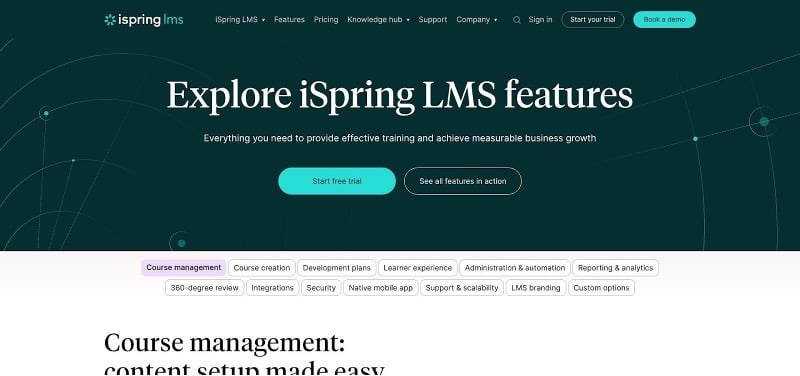
iSpring Learn LMS mobile app and course dashboard screenshot
The platform bundles its iSpring Suite authoring tool, so PowerPoint decks become SCORM 1.2 or 2004 packages with no extra plugins and no tracking gaps. Because the authoring stack and LMS come from the same vendor, interaction data flows without tweaking suspend-data limits.
Pricing stays simple: about £5.41 (≈ $6.70) per active user each month at the 100-learner tier, billed annually, with all mobile and authoring features included. You pay only when someone logs in, which keeps budgets predictable.
Where it falls short: advanced analytics rely on canned dashboards, so data-driven teams may export to a BI tool; Mac-first creators will spend more time in the browser editor because the full desktop authoring app is Windows-only.
If you need a mobile-first LMS that builds, delivers, and tracks SCORM content without hidden add-ons, iSpring Learn is an easy starting point.
3. Absorb: best for enterprise-grade offline SCORM
Global L&D teams pick Absorb when every interaction must count, even 35,000 feet in the air. According to Absorb’s support documentation, the mobile app lets learners download SCORM 1.2, SCORM 2004, xAPI, and AICC packages, complete them offline, and sync every question, score, and bookmark once they reconnect.
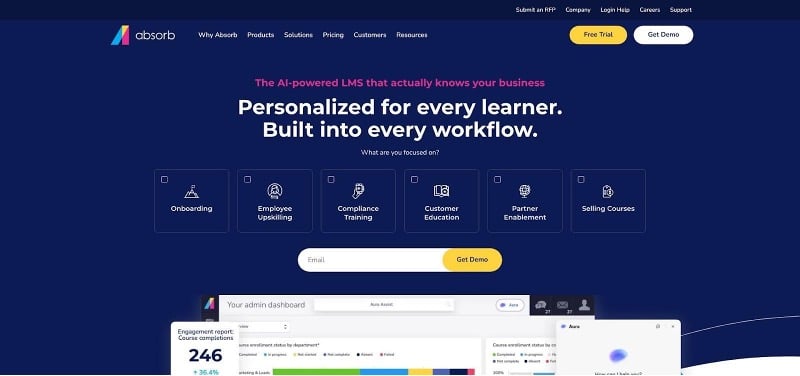
Absorb LMS mobile offline SCORM player and analytics screenshot
A dedicated mobile player preserves the full SCORM data model, so you keep question-level analytics and timing data for compliance audits. Multi-portal architecture then lets you serve employees, partners, and customers from a single instance, with SSO, HRIS, and Salesforce connectors ready to plug in.
Pricing is quote-only, and premium layers such as Create authoring, Analyze BI, and coach-and-mentoring modules add to the bill. Ask for an itemized proposal so Finance can see the true total cost.
Setup can sprawl. Spin up a sandbox first, refine roles and workflows, then clone that configuration across portals.
If you need reliable offline SCORM and the scale to handle complex hierarchies, add Absorb to your shortlist, and enter negotiations with a clear feature checklist and a firm ceiling.
4. Docebo: best for large enterprises and complex integrations
Docebo fits companies that count learners in the tens of thousands. According to Docebo’s help center, the Go.Learn mobile app lets users download SCORM 1.2 or SCORM 2004 3rd-edition packages, along with videos, slides, files, and HTML objects, finish them offline, then sync completions once a connection returns. Multi-SCO courses and heavy sequencing stay online-only, so compliance teams should plan accordingly.
The platform’s 400-plus connectors, automation engine, and multi-audience portals cut manual uploads. Interaction-level data flows into built-in dashboards or external BI tools, and the optional Learning Impact module tracks survey scores and business KPIs.
Pricing follows a monthly active-user model. Vendor materials list a baseline of about $9 per user with a 250-user minimum, before add-ons such as extended enterprise domains, AI search, or immersive VR. Negotiate multi-year contracts and request a line-item TCO calculator that covers storage tiers, AI credits, and support levels.
Implementation takes time, but once SSO and workflows are in place, admins can launch new audiences and automate enrollments with minimal upkeep. Test your own SCORM library, especially multi-SCO packages, during the pilot to confirm offline behavior before signing.
5. 360Learning: best for collaborative course creation
360Learning hands course building to the people who do the work. Subject-matter experts co-author lessons in a browser that feels like Google Docs, adding comments and reactions so content keeps pace with the job.
On mobile, learners use native iOS and Android apps to stream courses or download them for offline viewing. The 2024 release notes confirm that admins can enable offline access for SCORM 1.2 and all major SCORM 2004 editions; downloads occur per course, not automatically. If you rely on multi-SCO or heavy sequencing, run a pilot first because those packages still need a live connection.
Pricing stays clear for small teams: the Team plan costs $8 per active user per month for up to 100 users, billed monthly with no long-term commitment. Larger deployments shift to custom quotes, and the per-user rate rises quickly, so build an ROI model once you pass a few hundred seats.
Engagement tools such as discussion threads, reaction scores, AI prompts, and heat maps flag unclear slides and route feedback to creators in real time.
If you want to share in-house expertise and iterate courses quickly, 360Learning is a solid option. Verify offline needs early and keep an eye on seat count as you scale.
6. LearnUpon: best for support and multi-audience training
LearnUpon pairs strong customer service with a July 17, 2026 mobile release that lets learners, instructors, managers, and admins enroll users, track progress, and approve certificates directly from iOS or Android. That range matters when frontline managers need answers between site visits.
The player handles SCORM 1.2 plus SCORM 2004 3rd and 4th editions, and version control lets you swap an updated package without losing historical data. xAPI tracking works online only; offline SCORM remains on the roadmap, so test connectivity assumptions before committing.
Multi-portal architecture lets you create separate spaces for employees, partners, and customers while keeping analytics under one roof. Managers can switch portals with a single login, avoiding cloned instances.
Pricing starts at roughly 100 users and moves quickly to custom quotes. LearnUpon’s public FAQ notes that the platform is not suited to sub-100-user deployments. Add branded domains, premium support, and advanced analytics to the quote so Finance sees the full picture.
If you need responsive support, multiple audiences, and an admin-capable mobile app, place LearnUpon on your shortlist, but verify offline needs and user tiers first.
7. LearnWorlds: best for branded mobile academies and course sales
LearnWorlds turns training into a revenue stream. Its site builder, ecommerce engine, and white-label options let you launch an academy that looks like your own product, not a generic LMS.
LearnWorlds branded mobile academy and course sales interface screenshot
Mobile earns special focus. Add the Branded Mobile App Builder (from $149 per month) and you get iOS and Android apps with push notifications, biometric login, and in-app purchases. Learners can stream or download courses; offline video plays smoothly on low bandwidth. SCORM 1.2 and SCORM 2004 3rd-edition packages track completion online, but offline SCORM still needs field testing.
Interactive video stands out. Drop quizzes, chapters, or buy buttons onto the timeline, then check time-coded analytics to see where viewers pause or bounce.
Base pricing starts at $29 per month on the Starter plan, plus a $5 fee per paid course sale and standard payment-gateway charges. Brands should budget for the app fee, transaction costs, and Apple or Google developer accounts. Folded into lifetime value, these numbers still work for most paid academies.
If you aim to sell courses under your own logo and send timely updates to customers’ phones, LearnWorlds supplies the right tools. Confirm SCORM behavior offline and factor the mobile surcharge into your business model from day one.
8. Moodle: best open-source LMS for teams with technical muscle
Moodle is open source, so you choose where to host it, how to theme it, and when to audit raw database tables. That control appeals to universities and nonprofits that value ownership over vendor hand-holding.
The official Moodle app lets learners download SCORM 1.2 packages, work offline, and sync results once they reconnect. Full SCORM 2004 sequencing is not available in core, so complex branching requires plugins or workarounds.
Customization sets Moodle apart. Thousands of themes and extensions add H5P interactions, xAPI gateways, and advanced analytics, while REST and GraphQL APIs feed data into campus systems.
Freedom comes with chores. You will patch servers, vet plugins, and test each upgrade before production. Most organizations budget for a managed host or a part-time Moodle administrator, typically $150–$300 a month for small installs, so the “free” license is only the starting point.
If your team values data sovereignty and has the skills (or budget) to maintain it, Moodle remains the open-source benchmark. Plan for ongoing upkeep and accept that SCORM 1.2 is the ceiling unless you extend it yourself.
Honorable mentions and why they missed the cut
TalentLMS. Tiered pricing and an app that plays SCORM 1.2 offline are pluses, but the vendor’s docs confirm that SCORM 2004 and multi-SCO packages are not supported, limiting future growth.
CYPHER Learning. Provides a polished mobile app, AI authoring, and claims full SCORM 2004 support, yet we found no public proof that those courses run offline; until a version matrix appears, it remains under review.
Litmos. Earlier release notes referenced offline SCORM, but current documentation shows online-only playback. We await a 2026 update before reconsidering.
Each platform shines in at least one area but leaves a mobile or standards gap that mattered for this ranking. Close the gap, and we will revisit their place next year.
Buyer’s guide: how to choose a mobile, SCORM-ready LMS
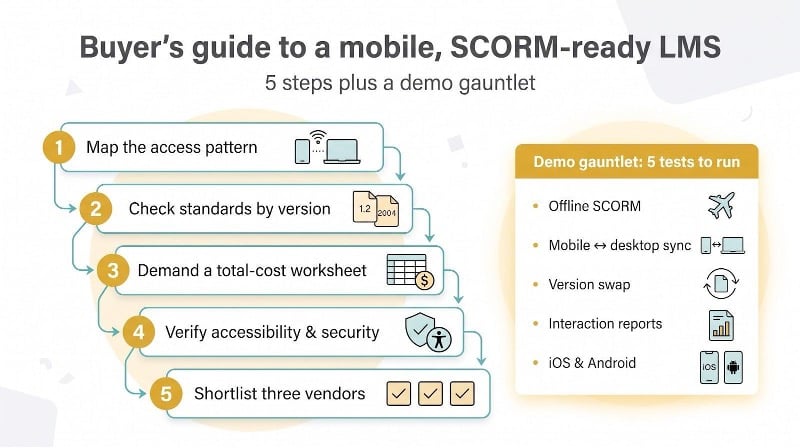
- Map the access pattern. A responsive site works for quick reading, but a native app pays off when bandwidth drops, push notifications matter, or frontline managers need reports on the move. Absorb’s download-and-sync workflow shows what “good” looks like.
- Check standards by version. SCORM 1.2 powers most legacy libraries, while SCORM 2004 adds sequencing and richer data. TalentLMS openly states it supports only SCORM 1.2, so multi-SCO packages and 2004 files remain outside the fence. If you plan to migrate or sell modern interactive content, that limit matters.
- Demand a total-cost worksheet. Ask vendors to list seats, branded apps, AI credits, SSO, premium support, storage, and data-export fees. In many bids, add-ons raise the first-year bill by 40 to 70 percent.
- Verify accessibility and security. Request the latest VPAT, SOC 2 (or ISO 27001) report, and data-residency options. For regulated sectors, missing certifications are deal breakers, not nice-to-haves.
- Shortlist three vendors. According to Capterra’s 2026 buyer study, successful adopters average three vendors on their shortlist, while disappointed buyers weigh four. A focused set of demos keeps negotiations honest and reveals performance gaps without decision fatigue.
Five tests to run during every demo
- Download a SCORM course, switch to airplane mode, complete it, then sync online.
- Start a quiz on mobile, finish on desktop, and confirm the score matches.
- Replace a live course with a new version while learners are mid-progress; check data integrity.
- Export interaction-level reports and verify they include offline attempts.
- Repeat the same flow on both iOS and Android to spot platform quirks.
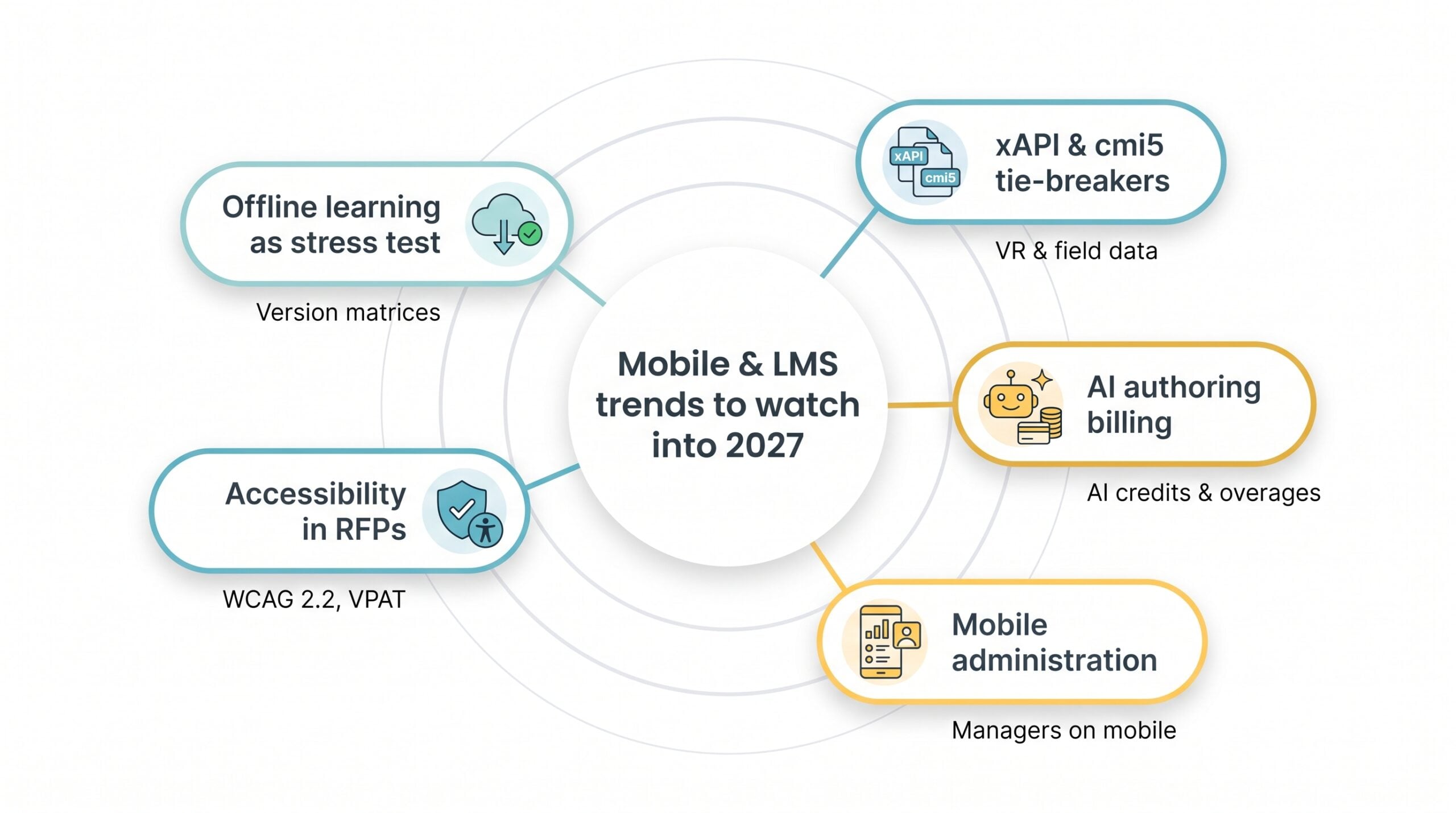
Mobile and LMS trends to watch into 2027
- Offline learning becomes a stress test. Buyers now request version-by-version matrices; Absorb’s detailed table shows exactly which SCORM 1.2 and 2004 data points sync offline. Vague “offline capable” copy is starting to raise red flags.
- xAPI and cmi5 shift from buzzwords to tie-breakers. SCORM stays the migration baseline, but teams tracking VR sessions or field tasks need the richer statements these standards provide.
- AI authoring adopts usage-based billing. Most platforms already draft quiz questions; the 2027 conversation will focus on how many AI credits come bundled and what overage costs.
- Mobile administration goes mainstream. LearnUpon’s 2026 app lets managers enrol users and pull reports from a phone, and rivals are likely to follow soon.
- Accessibility climbs the RFP. Vendors are updating VPATs to the new WCAG 2.2 level, and some now provide separate mobile-security audits alongside SOC 2 reports.
Frequently asked questions
What’s the best LMS for mobile learning?
There’s no universal winner. If you want balanced mobile plus authoring, iSpring Learn is the strongest pick. For reliable offline SCORM, Absorb leads, and for open-source control, Moodle is the choice.
Which platforms support SCORM 2004?
iSpring Learn, Absorb, Docebo, 360Learning, LearnUpon, and LearnWorlds support at least one SCORM 2004 edition. Moodle ships with SCORM 1.2 only.
Can SCORM courses run offline on iOS and Android?
Yes, provided the LMS includes an offline player. Absorb, iSpring Learn, and Docebo sync completions once you reconnect; LearnUpon still needs a live signal.
Is SCORM 1.2 enough in 2026?
It handles basic completion and scoring, but SCORM 2004 (or xAPI/cmi5) adds sequencing and richer data. Choose 2004 or xAPI if you need adaptive paths or detailed analytics.
What’s the most affordable SCORM-ready LMS?
As of October 2026, GoSkills offers a free Basic plan, with SCORM and xAPI uploads on LMS Pro at $9.71 per license per month. iSpring Learn lists about $6.70 per active user (100-user tier). 360Learning’s Team plan costs $8 per user (≤ 100 users). Self-hosting Moodle has no license fee, but you’ll still pay for hosting and maintenance.
Does Moodle support SCORM 2004?
Core Moodle tops out at SCORM 1.2. Community plugins can add partial 2004 features, but they’re less stable than native support.
Should we invest in xAPI or cmi5 now?
If you track real-world tasks, simulations, or VR, start piloting xAPI. cmi5 wraps xAPI in a stricter launch spec, making future migrations smoother.
How do we test an LMS before signing?
Follow the five-step demo gauntlet from the buyer’s guide: complete a SCORM course offline, swap devices mid-quiz, replace a live course, export interaction data, and repeat on both iOS and Android. Any stumble is a red flag.
Conclusion
Choosing the right LMS comes down to matching your mobile and SCORM requirements with a platform’s proven capabilities, true total cost, and roadmap. Use the ranking, buyer’s guide, and demo tests above to move quickly from research to confident purchase without costly trial and error.