

Everything You Need to Know About the PCI Express
Operation Modes
Contents
The PCI Express connection is based on the concept of a “lane,” which is a single-bit, full-duplex, high-speed serial communication. Lanes can be grouped to increase bandwidth. For example, when two devices use four lanes for their connection, they are considered an “x4” connection and will be able to achieve four times more bandwidth than a single connection, i.e., a single lane. In Figure 4, we illustrate two connected devices using two lanes, i.e., an “x2” connection. Although in theory any number from one to 32 lanes can be grouped, the most common numbers are x4, x8, and x16.
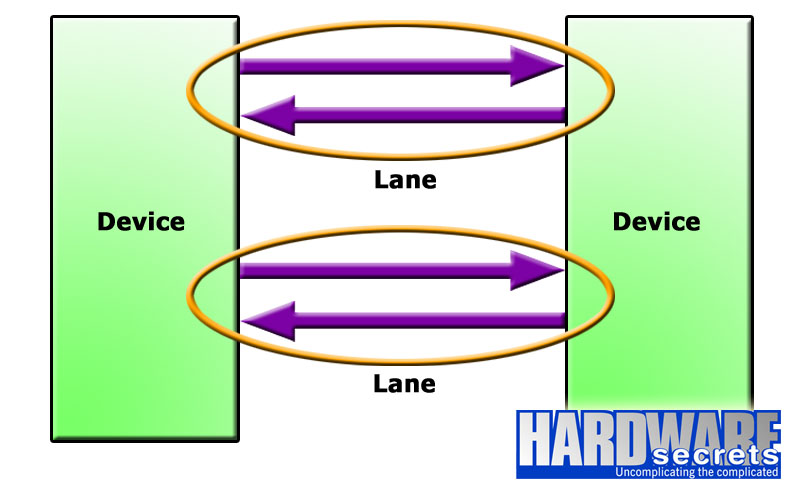
Figure 4: PCI Express x2 connection
PCI Express 1.0 and 2.0 use the 8b/10b encoding system (which is the same encoding used by Fast Ethernet, i.e., 100 Mbps, networks). This means that every eight bits of data are encoded and transmitted as a 10-bit number. Usually, to convert a figure given in bits per second (bps) to bytes per second (B/s) you need to divide it by eight since a byte is a group of eight bits. However, because of the 8b/10b encoding, we need to make this division by 10 rather than eight. This is the reason why, with a clock of 2.5 GHz and 5 GHz, the x1 bandwidth of these connections is 250 MB/s and 500 MB/s, respectively, and not 312.5 MB/s and 625 MB/s. The two extra bits added are called “overhead,” and they “eat” 20% of the channel bandwidth.
PCI Express 3.0 uses a different encoding system, called 128b/130b. As you can deduce, this encoding system transmits every 128 bits of data as a 130-bit number, which offers a far lower overhead. To transmit 128 bits of data, PCI Express 3.0 needs only two extra bits, while with the previous revisions, 32 extra bits are needed (two for every eight bits). Because of this lower overhead requirement, PCI Express 3.0 can achieve double the PCI Express 2.0 bandwidth with a clock rate of 8 GHz instead of 10 GHz.
PCI Express 4.0, which will be released in a couple of years, will maintain the same encoding as PCI Express 3.0, doubling the clock rate and, therefore, doubling the available bandwidth.
| Revision | Encoding | Clock | Bandwidth (x1) |
| 1.0 | 8b/10b | 2.5 GHz | 250 MB/s |
| 2.0 | 8b/10b | 5 GHz | 500 MB/s |
| 3.0 | 128b/130b | 8 GHz | 1 GB/s |
| 4.0 | 128b/130b | 16 GHz | 2 GB/s |
As explained, the grouping of lanes allows the bandwidth to be multiplied by the number of lanes used. So, an x8 connection with PCI Express 2.0 will have a bandwidth of 4 GB/s (500 MB/s x 8), while an x16 connection with PCI Express 2.0 will have a bandwidth of 8 GB/s (500 MB/s x 16). An x16 connection with PCI Express 3.0 will have a bandwidth of 16 GB/s (1 GB/s x 16).