

Everything You Need to Know About the PCI Express
Slots and Cards
Contents
The PCI Express specification allows slots to have different physical sizes, depending on the number of lanes connected to the slot. See Figure 5. This allows reducing the size of the space needed on the motherboard. For example, if a slot with an x1 connection is required, the motherboard manufacturer can use a smaller slot, saving space on the motherboard.
However, bigger slots can actually have fewer lanes than the diagram shown in Figure 5. For example, many motherboards have x16 slots that are connected to x8, x4, or even x1 lanes. With bigger slots, it is important to know if their physical sizes really correspond to their speeds. Moreover, some slots may downgrade their speeds when their lanes are shared. The most common scenario is on motherboards with two or more x16 slots. With several motherboards, there are only 16 lanes connecting the first two x16 slots to the PCI Express controller. This means that when you install a single video card, it will have the x16 bandwidth available, but when two video cards are installed, each video card will have x8 bandwidth each.
| Preview | Product | |
|---|---|---|

|
Mailiya PCI-E to Type-C + A 5-Port USB 3.0 PCI Express Card and 15-Pin Power Connector, Mini PCI-E... | Buy on Amazon |
The motherboard manual should supply this information. But a practical tip is to look inside the slot to see how many contacts it has. If you see that the contacts on a PCI Express x16 slot are reduced to half of what they should be, this means that even though this slot is physically an x16 slot, it actually has eight lanes (x8). If with this same slot you see that the number of contacts is reduced to a quarter of what it should have, you are seeing an x16 slot that actually has only four lanes (x4). It is important to understand that not all motherboard manufacturers follow this; some still use all contacts even though the slot is connected to a lower number of lanes. The best advice is to check the motherboard manual for the correct information.
A little-known fact is that you can install any PCI Express expansion card in any PCI Express slot. For example, you can install an x1 expansion card in any kind of PCI Express slot; it doesn’t need to be installed in an x1 slot. So, if you have an x4 expansion card but your motherboard doesn’t have an x4 PCI Express slot, no problem; simply install it in an x8 or x16 slot.
The same holds true for “bigger” cards. For example, you can install an x16 video card in a “smaller” slot. (The slot, however, must have its rear side open; otherwise, the bigger expansion card won’t fit. It is up to the motherboard manufacturer whether or not to provide slots with their rear side open.) The only disadvantage is that it will only have the maximum bandwidth provided by the slot; i.e., if you install an x16 video card in an x4 slot, it will have only x4 bandwidth available. On the other hand, this kind of installation may be useful in some situations, such as when building a computer with several video cards to have multiple displays available, and you are not worried about gaming performance.
To reach the maximum performance possible, both the expansion card and the PCI Express controller (available inside the CPU or inside the motherboard chipset, depending on your system) have to be of the same revision. If you have a PCI Express 2.0 video card and install it on a system with a PCI Express 3.0 controller, you will be limited to the PCI Express 2.0 bandwidth. The same video card installed on an old system with a PCI Express 1.0 controller will be limited to the PCI Express 1.0 bandwidth.
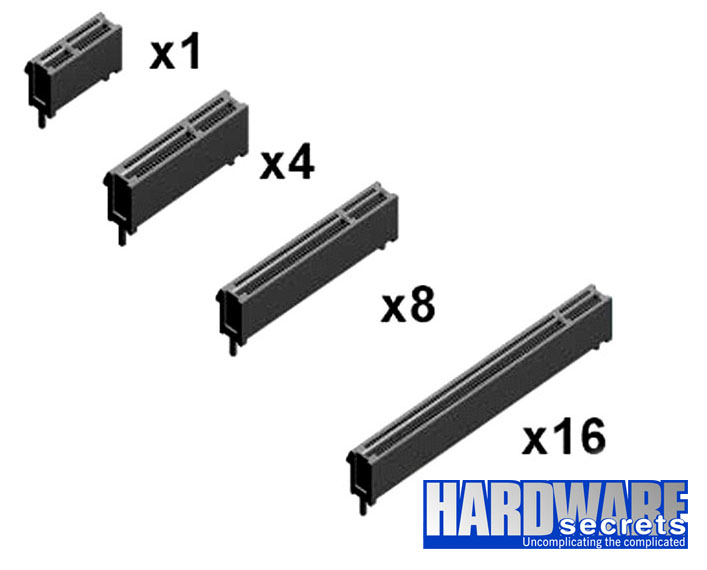
Figure 5: Types of PCI Express slots
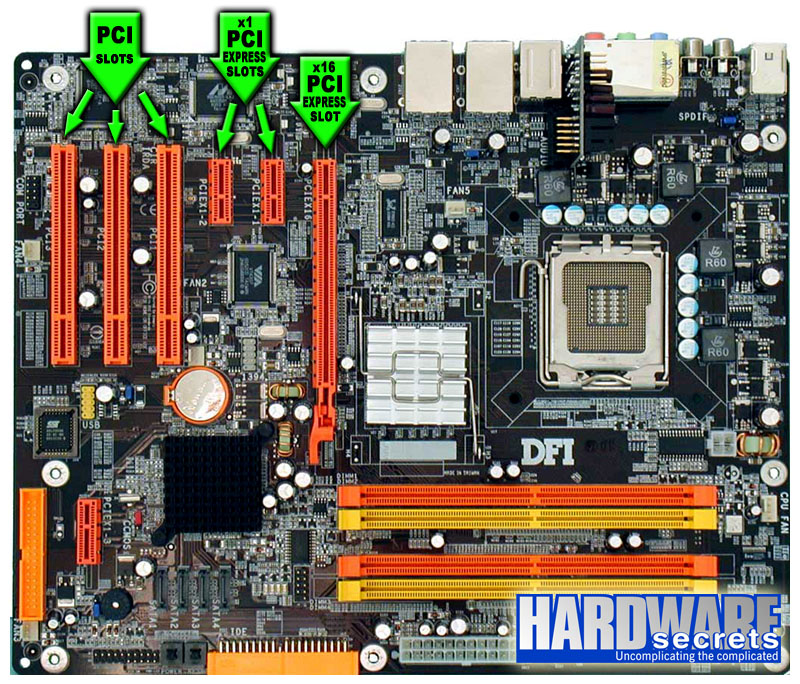
Figure 6: Details of the PCI and PCI Express slots on a motherboard
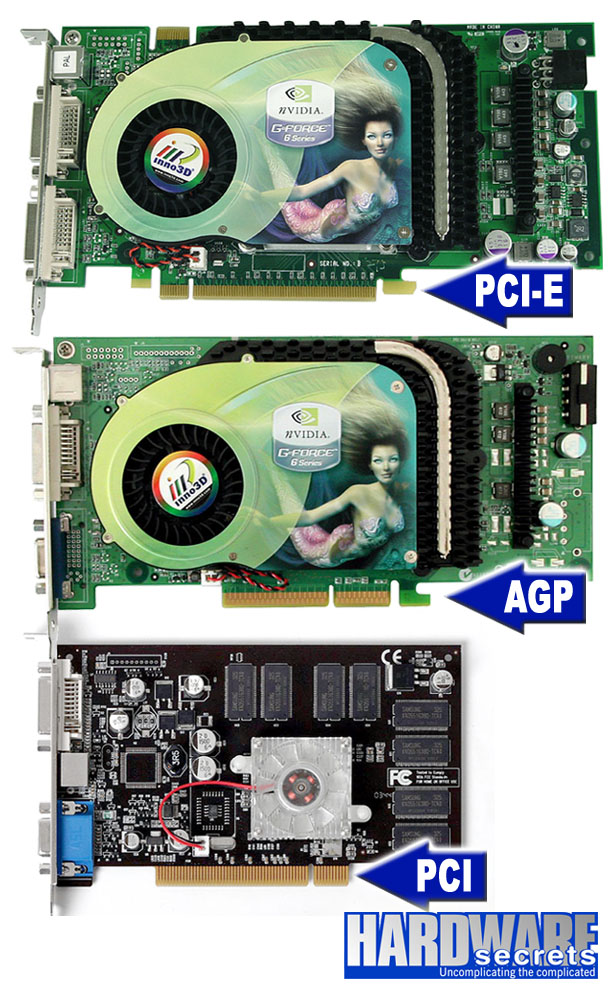
Figure 7: Differences in the edge contacts of PCI Express, AGP, and PCI video cards
What Are the Differences Between AGP and PCIe Graphics Cards?
The primary difference between AGP and PCI Express graphic cards is the dissimilar ports that they come with. AGP cards also tend to be a lot slower and PCIe cards, which is the reason why gamers and video editors tend to avoid AGP entirely.
However, the AGP’s legacy cannot be contested. This specific type of card was developed by Intel and was at an all-time high in popularity during the early 2000s. How so? Well, AGP was made specifically for 3D graphics and gaming, which is quite ironic seeing that today no gamer or 3D designer even thinks about buying an AGP card.
Now that we’ve got the main grip out of the way, let’s see what other notable differences there are between AGP and PCI Express cards.
- Contrary to your intuition and logic, PCI Express cards did not replace PCI cards. Instead, PCI cards got replaced by AGP cards and then AGP cards got replaced by PCI Express video cards. Now that’s a mouthful!
- Another key difference is their interface: AGP is dedicated, point to point, whilst PCIe is a two-way serial connection.
- Furthermore, the distance between the card’s bracket and the start of the connector is greater on AGP cards and much smaller on PCIe cards.
- You’ll also find that the slots on the motherboard for each one are different – AGP slots are usually brown while PCIe slots are white or other more attractive colors.
- When it comes to the overclocking speed, AGP goes up to 8x while PCIe can go double – up to 16x. Visit pcguide101 if you want to check pcie version.
The Bottom Line
Now you’ve learned probably all there is to know about PCI Express graphics cards. If you have any other inquiries on this topic, feel free to leave us a comment below and start a discussion with the rest of our community.
Last update on 2026-10-23 at 03:20 / Affiliate links / Images from Amazon Product Advertising API