Top 10 Pokémon GO Cheats That Expert Players Use
Kuala Lumpur is about to get loud. PokéXciting!, the opening stop on Pokémon’s 30th anniversary tour, lands at KLCC Park on September 12 and 13, and Pokémon GO is riding along with a turquoise-costumed Pikachu, two GO Stamp Rallies, Gigantamax Battles, and bonuses you won’t find anywhere else.
Not everyone can hop on a flight to Malaysia for a weekend, though. Between work schedules, school, ticket prices, and plain old distance, most trainers are watching this one from home. That’s a big reason people go looking for Pokémon GO cheats and other third-party tools in the first place — GPS spoofing especially, since it’s the fastest way to reach content that would otherwise be locked to one park on the other side of the world. Here are ten cheats trainers are actually using this year.
10 Pokémon GO Cheats You Should Know in 2026
1. GPS Spoofing
Spoofing tricks your phone into telling Pokémon GO you’re standing somewhere you’re not. Trainers use it to reach event zones, rare spawns, and region-locked Pokémon without leaving their neighborhood.
2. GPS Joystick
A GPS joystick puts a virtual control stick on your screen so you can nudge your avatar around bit by bit instead of jumping straight to a new spot. Great for lining up with a gym that’s just out of range.
3. Custom Routes
Instead of walking a route yourself, you can draw or import a custom route on a map and have the app simulate movement along it. Handy for hatching eggs or piling up buddy distance while you’re sitting on the couch.
4. Auto Catch
Auto catch throws Poké Balls at nearby Pokémon for you. When a spawn train hits during an event and there are twenty Pokémon on screen at once, this saves your thumbs.
5. Auto Spin
Same idea as auto catch, but for stops and gyms — auto spin grabs items from PokéStops and Gym discs on its own, so you’re not tapping each one by hand.
6. IV Checking
A Pokémon’s IVs (Individual Values) decide how strong it can eventually get. IV-checking tools go through your box and tell you which catches are worth powering up or trading and which ones are just taking up space.
7. Quick Catch
Quick-catch tricks cut down the time each encounter takes — a faster throw animation here, a shorter capture sequence there — so you can burn through spawns without standing around.
8. Enhanced Throws
Throw-assistance tools help with the aim and timing behind a good curveball, landing more Excellent and Great throws. Useful if you’re chasing catch bonuses, or just sick of watching balls sail past a Snorlax.
9. Movement & Speed Simulation
Some tools let you set a walking speed and simulate movement at that pace, covering a whole neighborhood the way you actually would on foot, just without the actual footsteps. It’s a slower, more deliberate cousin of straight-up spoofing.
10. Native Mode
Native Mode is the newer name in location spoofing, and the difference is that it runs alongside the real Pokémon GO iOS app rather than a modified copy of it. Nothing about the game itself gets touched, which matters to trainers who don’t want to leave the official app. MocPOGO’s version of Native Mode currently handles teleporting, so iOS users get a location change without ever installing anything unofficial.
Ten cheats, ten different problems — distance, repetition, precision, take your pick. Juggling five separate apps to cover all of it gets old fast, which is why a lot of trainers land on MocPOGO instead.
MocPOGO: An All-in-One Pokémon GO Cheat Tool
MocPOGO packs most of the tools above into one app. Spoofing and location changing, a GPS joystick, custom routes with adjustable movement — it’s all there. Auto Catch and Auto Spin work quietly in the background so you’re not tapping through every stop and spawn by hand, and the Pokémon GO Assistant handles a few extra odds and ends on top of that.
MocPOGO runs on iOS, Android, Windows, and Mac, so you’re not stuck picking one device. For players who’d rather not install five separate apps to cover five separate cheats, that’s the main appeal — one download for spoofing, movement, and automation, whether you’re chasing an overseas event or just trying to farm a route without wearing out your thumbs.
How to Use MocPOGO for Pokémon GO Spoofing
Setup takes five steps:
Step 1: Install and launch MocPOGO
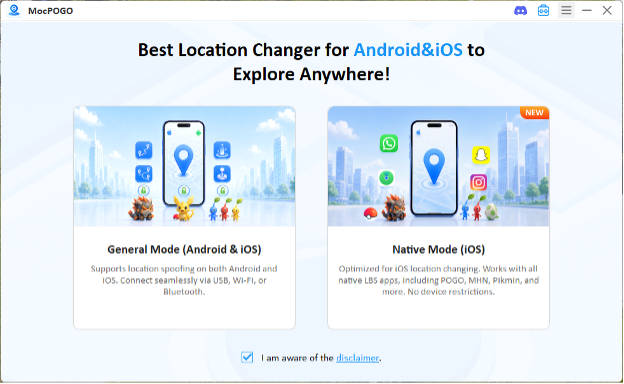
Grab the version for your device — iOS, Android, Windows, or Mac — and open it up.
Step 2: Connect your phone and select the mode
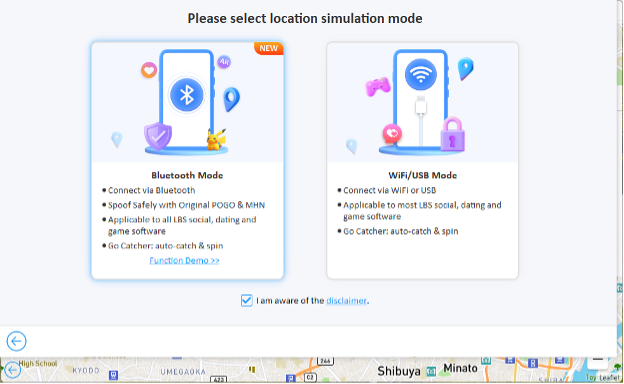
Follow the prompts on screen to connect your phone, and pick the location simulation mode that matches your setup.
Step 3: Choose a location
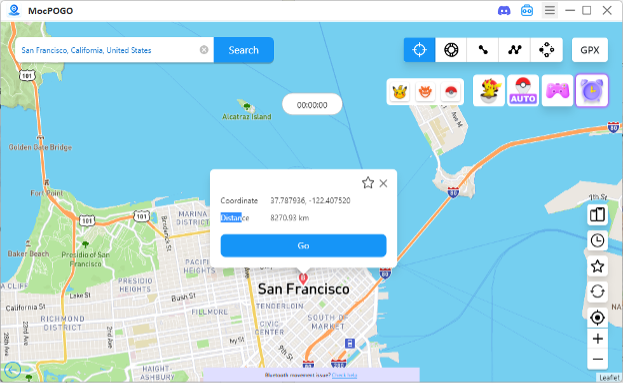
Type in a city, address, or coordinates and tap your destination on the map.
Step 4: Teleport or simulate movement
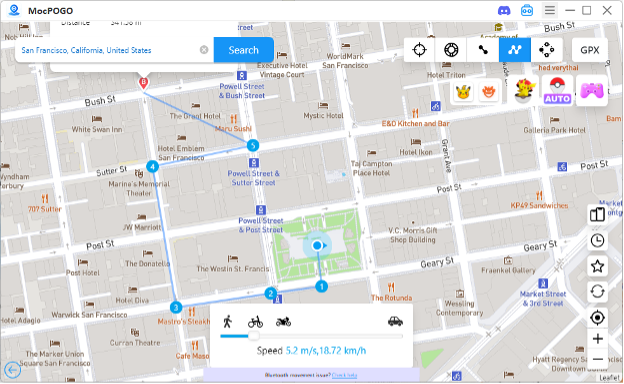
Teleport jumps you there instantly. The joystick or a custom route works better if you want the movement to look natural.
Step 5: Launch Pokémon GO
Open the game on your phone, check that your location is updated, and go from there — Auto Catch, Auto Spin, and the Assistant are ready whenever you need them.
Things to Know Before Using Pokémon GO Cheats
Niantic’s rules don’t allow third-party software or movement that no real person could pull off, and accounts caught doing it can get warned, restricted, or banned outright. Go in knowing that’s the tradeoff — don’t find out the hard way.
A couple of habits go a long way here. Don’t jump between far-apart locations back to back, especially not in ways a real trainer couldn’t manage, and give teleports a cooldown before moving again instead of chaining them one after another. Steer clear of modified or unofficial Pokémon GO apps too — beyond the ban risk, downloading random files from unknown sources is its own headache. MocPOGO has a cooldown timer built in that keeps track of the wait time after a teleport, which takes some of the guesswork out of staying under the radar.
Conclusion
Between GPS spoofing, joystick controls, auto catch, IV checking, and Native Mode, the cheats trainers lean on in 2026 solve pretty different problems — some get you to places you can’t travel to, others just save your thumbs from a thousand taps. MocPOGO folds a lot of that into one app across iOS, Android, Windows, and Mac, but no single tool is the right call for everyone. Pick based on what your own gameplay actually needs, and know the risks going in before you install anything.